
How to get clients from LinkedIn: a CEO's guide to outreach and social selling
Published: · Updated: · 11 min read
Quick answer
Why LinkedIn, and why the CEO's own profile?
LinkedIn has more than a billion members in over 200 countries and territories, including about 3.1 million in Israel, according to LinkedIn's advertising data from late 2025. It is the only place where you can find a CEO, a CFO or a head of sales by role, company and size, and send them a direct message.
But most of the work happens before the message. According to 6sense's 2025 Buyer Experience Report, buyers initiate the first contact with a vendor about 80% of the time, and the vendor they contact first wins the deal about 80% of the time. 94% of buying groups had already ranked their preferred vendors before the first conversation.
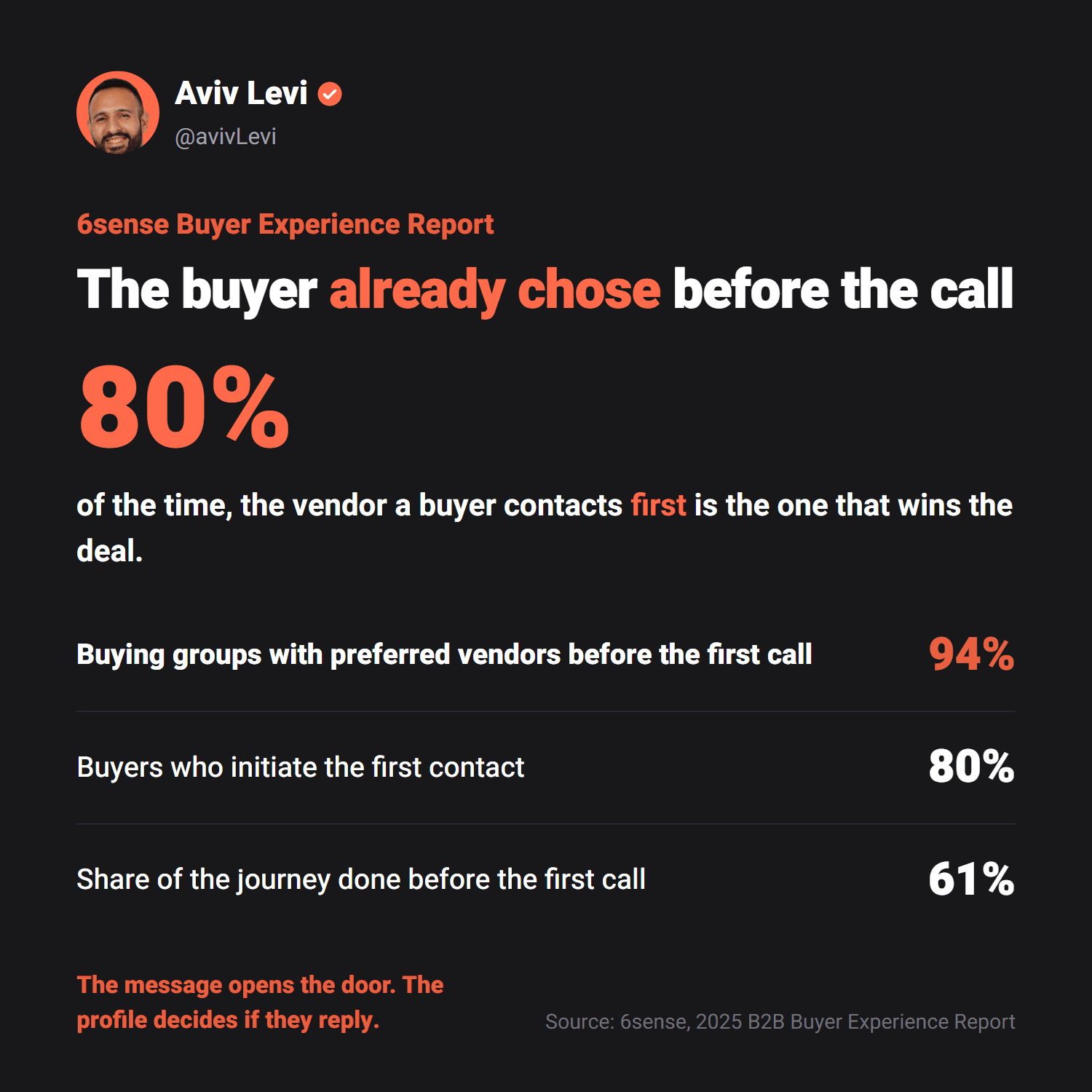
What this means: a good message opens a door, but whether someone answers depends on what they already know about you. And what they know comes mostly from your profile and your content. In the 2025 Edelman-LinkedIn B2B Thought Leadership Impact Report, 56% of buyers said they use vendors' thought leadership in their vendor evaluation, and 41% said a C-suite executive encouraged them to consider a vendor after engaging with its content.
That is why I treat the CEO's profile as a sales channel. It is the first thing a buyer opens when your message arrives, and it is what makes them reply.
What is social selling, and what is outbound?
The two terms describe the two engines:
- Social selling is building relationships and trust before the sale: content that shows expertise, thoughtful comments on prospects' posts, and a network of the right decision-makers. The buyer comes to you, or at least already knows you when you reach out.
- Outbound is the active step: you choose who to talk to, send a connection request and a personal message, and run the conversation until there is a meeting.
LinkedIn measures social selling with a score called the SSI (Social Selling Index), from 0 to 100. According to LinkedIn's internal research, social selling leaders create 45% more sales opportunities and are 51% more likely to reach quota. That is a correlation, not proof of cause, but the direction is clear: people who build a presence sell more.
Each engine on its own is weaker. Content without outreach waits for someone to show up. Outreach without content looks like one more spam message. The combination is what books meetings.
How many connection requests get accepted, and how many people reply?
The largest datasets come from companies that build outreach tools. Expandi analyzed more than 13 million connection requests from 13,302 accounts between May 2025 and April 2026. Belkins analyzed more than 15 million contacts, including 11.5 million connection requests sent in 2025.
| Metric | Expandi (2025-2026) | Belkins (2025) |
|---|---|---|
| Connection requests accepted | 28.5% | 26% |
| Replies to messages | 10.4% | 7.2% |
| Replies to the connection note | 3.0% | – |
| Meetings, out of those who connected (Belkins' own campaigns) | – | 1.3% |

Two things stand out. First, the sender's title barely matters. In Expandi's data, C-level senders got 29.4% acceptance and junior senders 26.3%. What matters is who you target and what you write. Second, fewer people answer the connection note: from 3.5% in May 2025 to 2.2% in April 2026. People get more outreach and reply less to a sales opener.
And it matters where the numbers come from: mostly accounts using tools that send outreach in bulk, the kind of tools LinkedIn prohibits. Treat them as a floor, not a target.
What are my numbers?
On my profile and my clients', 5% to 10% of cold messages turn into a sales call, depending on the market and the audience. In three months I met more than 100 CEOs, only from content and LinkedIn messages.
This is not the same metric as Belkins', which measures meetings out of those who connected, so the comparison isn't exact. But the gap shows the difference between targeted, personal outreach backed by content and sending in bulk.
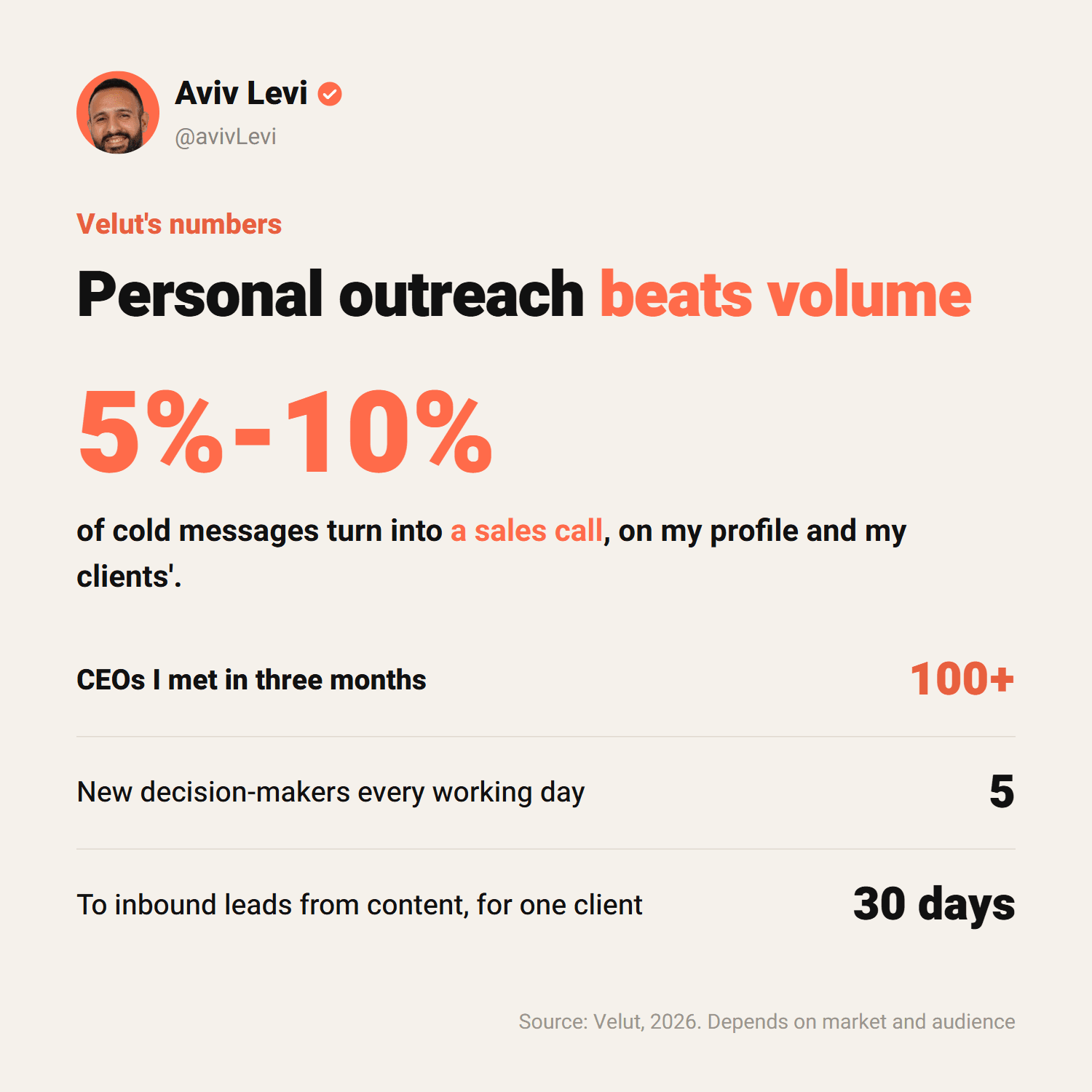
Content also does part of the work without any outreach. One CEO we started working with posted three times a week and got five likes per post. Within 30 days we brought him inbound leads, from content alone.
How to do it: the 7-step method
Step 1: Define who you reach out to
Before the first message, write down exactly who the buyer is: role, industry, company size, region, and the problem you solve for them. The more precise the list, the more people accept and reply. A broad list is the most common reason for weak results.
For precise search by role, company size and job changes, many people use Sales Navigator, LinkedIn's paid sales tool. It also includes 50 InMail messages a month. You don't need it to start, but it saves a lot of time.
Step 2: Turn your profile into a landing page
Everyone who gets a connection request from you opens your profile. Within seconds they need to understand who you are, who you help and why they should reply: a headline that says what you do and for whom, a professional photo, an About section about the buyer rather than about you, and recent posts that show expertise.
Step 3: Warm up before you reach out
Before the connection request, be present: leave a thoughtful comment on the person's post, follow them, view their profile. Expandi recommends this kind of warm touch too, so your name is familiar when the request arrives. And if you post content regularly, much of your audience has already seen you in the feed.
Step 4: Send a connection request with a short note
Note or no note? In Belkins' data, requests without a note were accepted slightly more often (27.6% vs 25.3%), but people who accepted a request with a note replied far more often (8.2% vs 5.3%). The note filters: whoever accepts already knows why you reached out.
One limit worth knowing: a free account can add a note to only five requests a month, up to 200 characters. Premium members can add unlimited notes, up to 300 characters each.
Hi Dana, I read your post on hiring salespeople in the north and it resonated. I work with CEOs in your space and would be glad to connect.Example connection note, about 140 characters
Step 5: A first message about them, not you
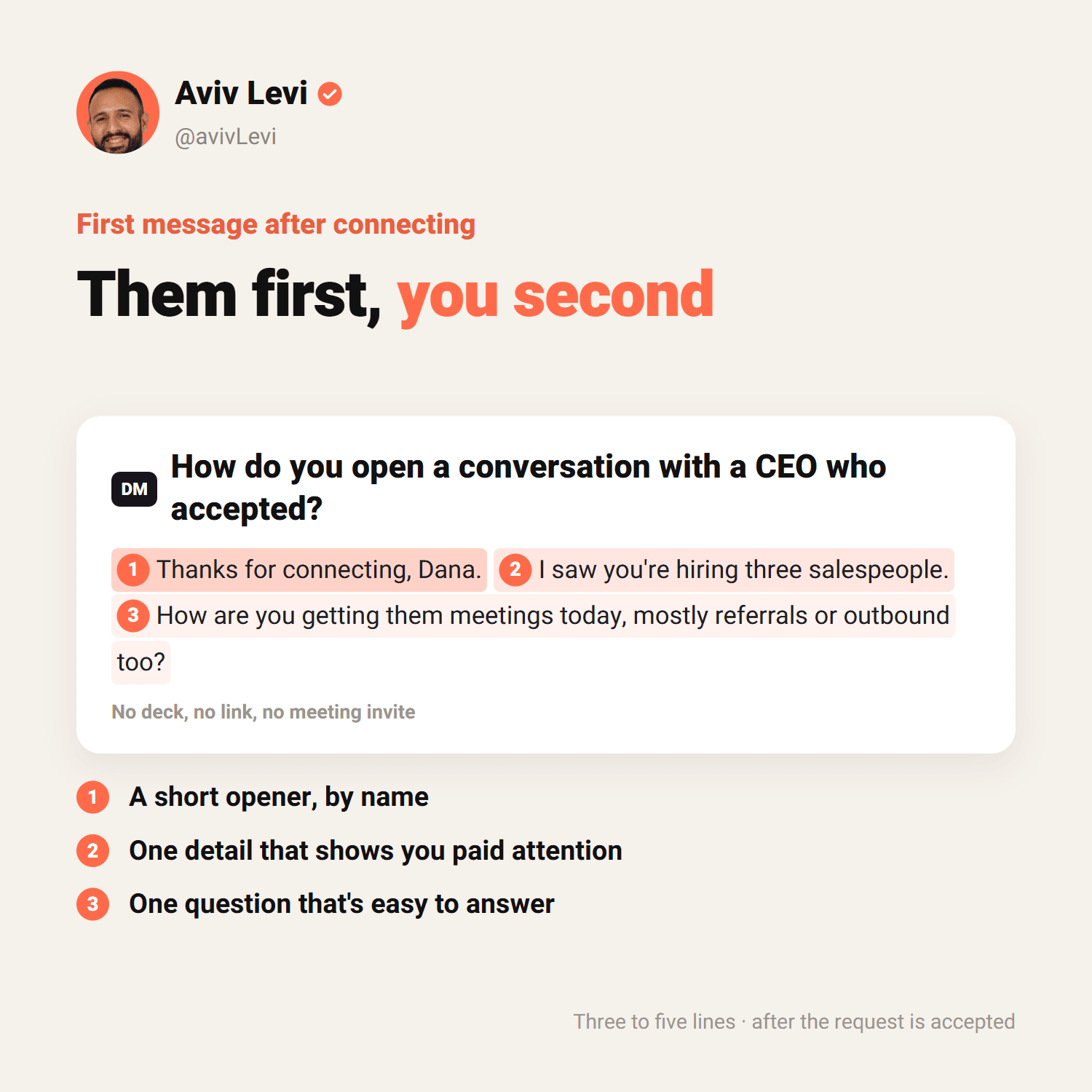
Once the request is accepted, don't jump into a pitch. The first message is short, personal and ends with a question that is easy to answer. It shows you understood something about their business, not that you have a deck.
- Three to five lines. If it needs scrolling, it is too long.
- One detail that shows you paid attention: a post, a hire, a launch, a new role.
- One question at the end. Not a meeting invite, not a link.
Step 6: One or two follow-ups, with value
Many conversations don't get a reply to the first message. Follow up a few days later with something new: a data point, a relevant article or a different question. Not "just bumping this". After two messages without a reply, stop.
Step 7: Move to a call, and measure every week
When there is interest, suggest a short call with a set length. And measure three numbers every week: how many requests were accepted, how many replied, and how many reached a call. If few people accept, the problem is the list or the profile. If they accept but don't reply, the problem is the message.
In Velut's lead generation service it looks like this: at least 100 personal outreach messages a month, five new decision-makers every working day, each message written one by one without automation tools, and every conversation managed until the meeting is on the calendar.
What is InMail, and when should you use it?
InMail is a message to someone you are not connected to. It is a paid feature: free accounts can only message their connections. The monthly number depends on the plan: 5 on Premium Career, 15 on Premium Business and 50 on Sales Navigator.
On Sales Navigator, every InMail that gets a response within 90 days returns its credit, even if the answer is "not interested". That makes InMail right for a few precise messages to decision-makers who don't accept connection requests, not for sending in bulk.
Can you use automation tools?
According to LinkedIn, no. Its prohibited-software policy bans third-party software, bots and browser extensions that automate activity on the site, including sending messages, adding contacts and liking posts. Members who use them risk having their accounts restricted or shut down.
There are limits even without automation. LinkedIn caps connection requests for every account, and going over the limit can block you from sending invitations, typically for a week. It does not publish the exact number. The safe way is fewer, more targeted requests to people who are genuinely relevant.
To me this is also a question of results, not just risk. The decision-makers you want to meet get dozens of template messages. A message written for them stands out precisely because of that.
The common mistakes
- Sending a deck in the first message. Nobody wants a proposal from someone they don't know.
- A list that is too broad. "Tech executives" is not a list. "VPs of sales at software companies with 50 to 200 employees" is.
- A profile that doesn't explain what you do. It is the first thing the buyer checks.
- Endless follow-ups. Two reminders without a reply are a reply.
- Outreach only, no content. Without a presence in the feed, your message is one more note from a stranger.
- Not measuring. Without the three numbers you can't know what to fix.
How long does it take to see results?
Outreach can bring conversations in the first weeks, because you are the one starting them. Content takes longer, because it builds reputation. For the CEO in the example above, inbound leads from content started arriving within 30 days.
Together they build a steady pipeline: outreach brings conversations now, and content makes more people answer it, and come to you on their own.
Frequently asked questions
How many LinkedIn connection requests can you send per week?
LinkedIn doesn't publish an exact number. It limits every account, and going over the limit can block you from sending invitations, typically for a week. Estimates from LinkedIn tool companies are around 100 to 200 a week, depending on the account. Velut's lead generation service reaches out to five new decision-makers every working day.
Should you send a connection request with a note or without one?
With a short, personal note. In Belkins' study, requests without a note were accepted slightly more often (27.6% vs 25.3%), but people who accepted a request with a note replied more often (8.2% vs 5.3%). Free accounts can add a note to only five requests a month.
Do you need Sales Navigator to get clients from LinkedIn?
No. You can start with regular search and content. Sales Navigator helps when you reach out to many decision-makers: precise search by role and company size, alerts on changes, and 50 InMail messages a month.
What is a good reply rate on LinkedIn?
In the largest studies, 26% to 28.5% of connection requests are accepted and 7% to 10% of messages get a reply. Those are bulk-outreach numbers. Targeted, personal outreach can do better: on my profile and my clients', 5% to 10% of cold messages turn into a sales call.
Can you use automation tools to send LinkedIn messages?
No. LinkedIn prohibits software, bots and extensions that automate activity on the site, including sending messages and adding contacts, and members who use them risk having their accounts restricted or shut down.
What is the difference between social selling and outbound?
Social selling builds trust before the sale, mostly through content and comments, so the buyer already knows you. Outbound is the active outreach: you choose who to contact and send a personal message. It works best combined: content makes more people answer your outreach.