
Google AI Mode: what it is, how to turn it on and how to get cited in it

Published: · Updated: · 12 min read
Quick answer
What is Google AI Mode?
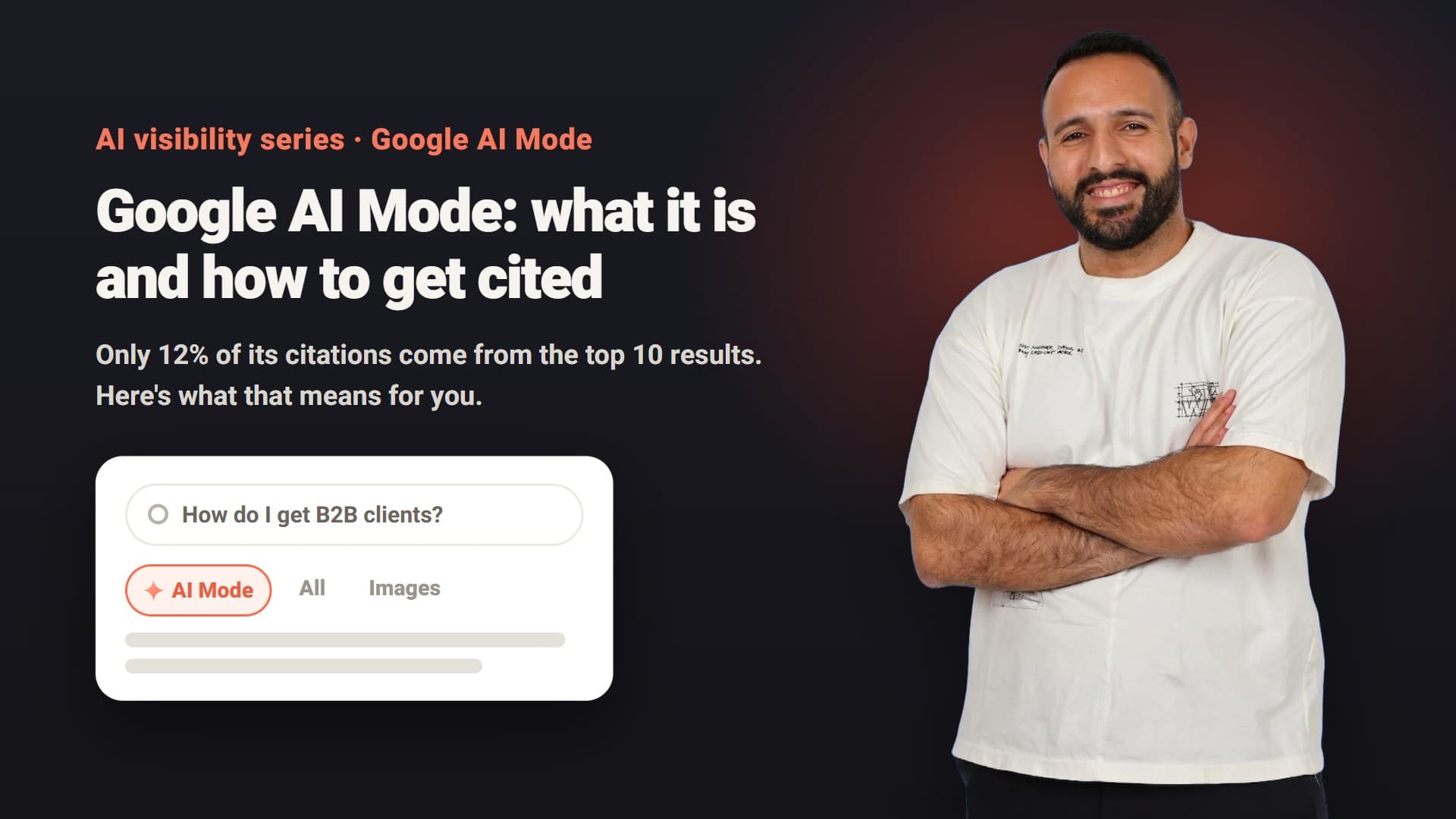
AI Mode is a tab inside Google Search. Instead of ten blue links you get a written answer with links to its sources, and you can keep asking follow-up questions as in a conversation. It runs on Gemini, and Google positions it for questions that need exploration, comparison and reasoning.
Google announced it at I/O in May 2025. In August 2025 it expanded to more than 180 countries and territories in English, and in October 2025 it added more than 35 languages, including Hebrew. It takes text, voice and image questions, and when the system isn't confident enough in an answer, it falls back to regular search results.
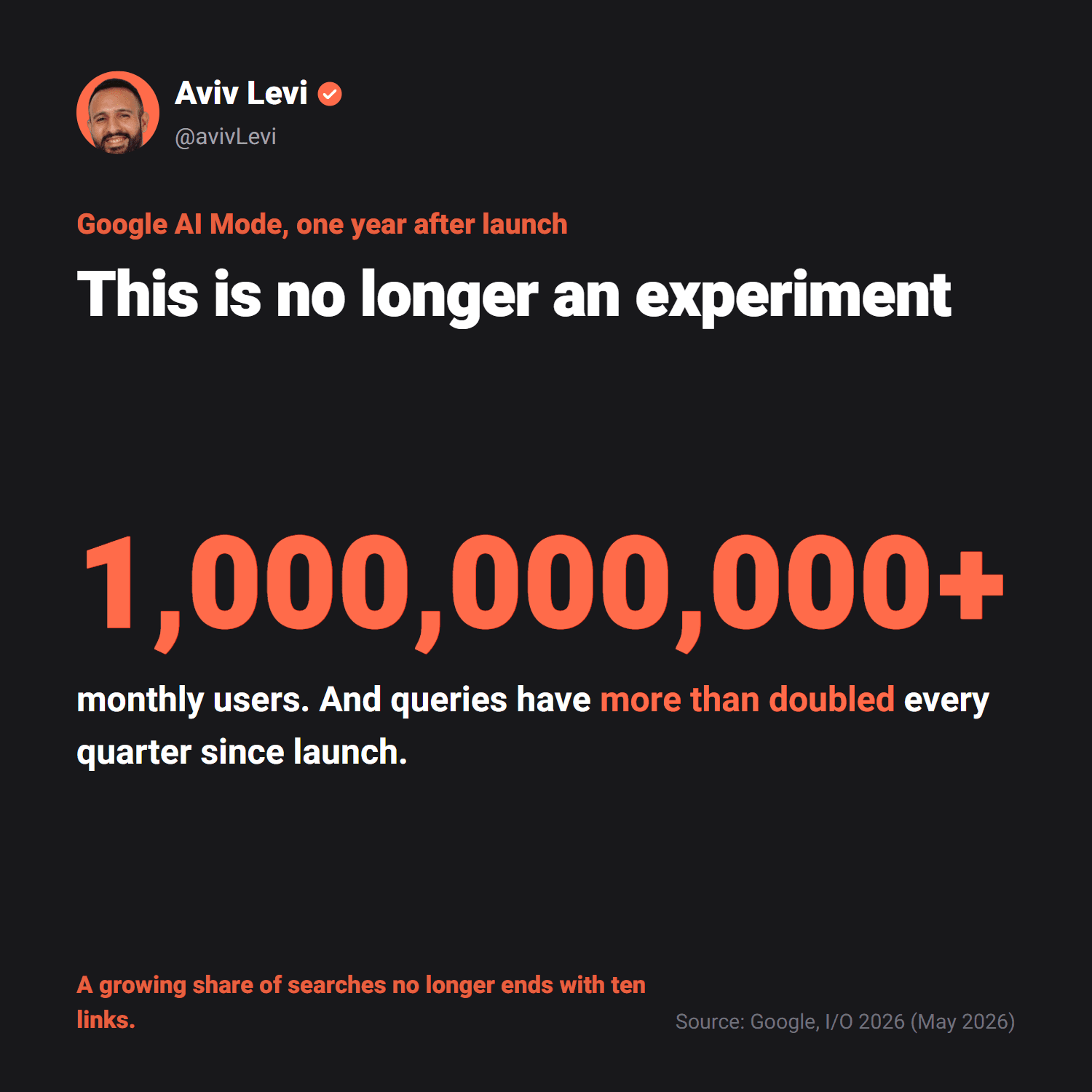
In May 2026, one year after launch, Google said AI Mode had passed one billion monthly users, with queries more than doubling every quarter since launch. That is Google's own number, but the direction is clear: a growing share of searches no longer ends with ten links.
How do you turn on Google AI Mode?
There is nothing to install and no setting to switch on. According to Google's help center, there are three ways in:
- Go to google.com/ai. The conversation screen opens directly.
- From Google Search. Type a question in the search bar and click "AI Mode".
- In the Google app. Tap the AI Mode icon on the home screen.
Chrome on desktop has a shortcut too: click "AI Mode" next to the search box on a new tab or next to the address bar, or press Tab and then Enter. In AI Mode you can ask by text, voice, image or file, and keep going with follow-up questions. To return to earlier conversations, your Google account history needs to be on. Without it AI Mode still works, but it doesn't keep your conversations.
Why don't I have AI Mode?
In Chrome, AI Mode is not yet available to everyone or on every device. Google says it is gradually coming to people outside the US and to non-English languages. If the button isn't there, try google.com/ai or the Google app. The button may also be hidden: right-click the address bar and check that "Always show AI Mode" is selected. On a supervised child account, AI Mode settings are managed in Family Link.
What about age and account type? In Google's help center, the requirement for a personal Google Account (not a Google Workspace work or school account) and an age of 13 or older appears on the page for the "AI Mode" experiment in Search Labs, an opt-in experiment for early access to new capabilities. The page for regular AI Mode doesn't list those conditions.
Age 18 and over is listed only for specific capabilities inside AI Mode: personalized responses based on your history, and image generation with Gemini 3 Pro. To use Gemini 3 Pro you need to be signed in to a personal Google Account. And on a Workspace account where the organization has turned off Search and Assistant, Search history is unavailable and only the administrator can enable it.
How do you turn off AI Mode?
AI Mode doesn't open on its own: it only runs when you choose it. Google says Search features can't be turned off, but after a search you can pick the "Web" filter, which shows only text-based links, without AI Overviews. In Chrome you can hide the button: right-click the address bar and unselect "Always show AI Mode".
How do you delete your AI Mode history?
- One search: on a computer, open AI Mode, click "AI Mode history" on the left, then click More next to the search and the delete icon.
- All of it: at the top of "AI Mode history", click More and then "Delete all". You can also delete AI Mode activity from the Search history page in your Google Account.
- What happens next: a deleted search may still show in My Activity for a while and is auto-deleted there in less than 24 hours. If you moved into AI Mode from an AI Overview, two entries are saved, so you also need to delete the search from your Google Search history.
How fast is AI Mode growing?
Israel is a clean case study, because AI Mode arrived in Hebrew on a known date: 8 October 2025. In September 2025 the Hebrew term "מצב ai" ("AI mode") was searched 20 times a month on Google in Israel. In October, the launch month, 2,900 times. By January 2026 it was 18,100, and from May to August 2026 it held at 27,100 searches a month. The English "ai mode" grew from 2,400 to 22,200 a month in Israel over the same period, and some people type the name the way it sounds in Hebrew letters ("מצב אי אי", 880 searches a month, checked 13 October 2026).
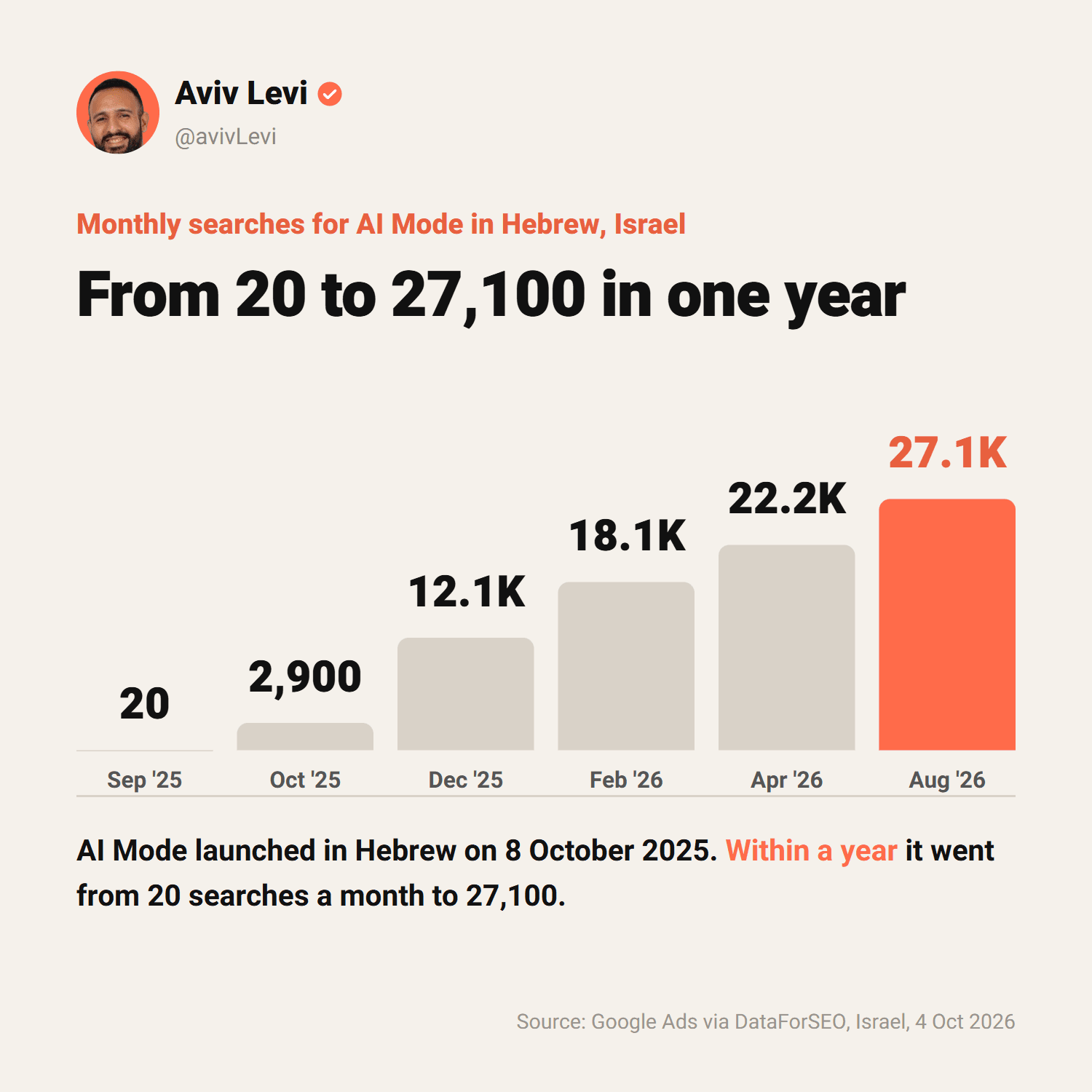
To be precise: these are searches for the term, not users. People who already use AI Mode don't need to search for it. But it is a good awareness signal: within a year, AI Mode went from something nobody searched for to something tens of thousands of people look up every month in one small market.
How is AI Mode different from AI Overviews, ChatGPT and regular search?
People often confuse AI Mode with Google AI Overviews, the summary that sometimes appears at the top of regular results. Both are Google, both run on Gemini, but they work differently, and Google says they may use different models and techniques. I added ChatGPT search to the table too, because it also answers in a conversation and links to sources:
| AI Mode | AI Overviews | ChatGPT (search) | Regular search | |
|---|---|---|---|---|
| Where it appears | A separate tab, full conversation screen | A summary above the results | Inside the chat, on chatgpt.com and in the apps | A list of results |
| When | When the user chooses it | Only when Google thinks it adds value | When ChatGPT decides the question needs current information, or when you pick "Search" | Always |
| Follow-ups | Yes, as a conversation | You can continue into AI Mode | Yes, as a conversation | A new search |
| Sites linked | ~7 unique domains on average (Semrush, 2025) | ~3 unique domains on average (Semrush, 2025) | Inline citations and a "Sources" button. OpenAI publishes no average | 10 results per page |
| What it takes to appear | An indexed page eligible for a snippet | An indexed page eligible for a snippet | Allowing OAI-SearchBot to crawl the site | Organic ranking |
The last row matters most: according to Google, there are no additional technical requirements to appear in AI Mode. What matters is how the system chooses, out of all eligible pages, the ones it cites.
ChatGPT is similar. According to OpenAI, search is available to all users, including free and logged-out users, and it draws on third-party search providers and content from partners. To be eligible, a site has to allow the OAI-SearchBot crawler, and even then OpenAI says placement is not guaranteed. What else affects citations there is covered in my guide to getting ChatGPT to cite you.
How does AI Mode decide who to cite?
This is where a term worth knowing comes in: query fan-out. Here is how Google describes it:
"Under the hood, AI Mode uses our query fan-out technique, breaking down your question into subtopics and issuing a multitude of queries simultaneously on your behalf."Liz Reid, Head of Google Search, Google I/O, May 2025
In practice, a cybersecurity startup CEO asks: "How do I build a LinkedIn presence that books meetings with CISOs in the US?" AI Mode doesn't search for that sentence as is. It breaks it into sub-questions, for example:
- How do CISOs use LinkedIn?
- What should a cybersecurity CEO's profile say?
- How many posts a week does it take to build presence?
- How do you send LinkedIn messages without getting restricted?
- Who manages LinkedIn for CEOs?
It runs a separate search for each sub-question, gathers different pages, and builds the final answer from all of them. That is why one great page is no longer enough. If you only wrote about "CEO personal branding", you might show up for one of five sub-questions. Whoever has a strong answer to three or four of them becomes the source the model keeps coming back to.
That is the logic behind my AI visibility series: not one post, but a body of knowledge that answers all the small questions that make up the big one. For example, the sub-question about LinkedIn messages is answered by my guide to LinkedIn outreach.
Why doesn't ranking first on Google guarantee you appear?
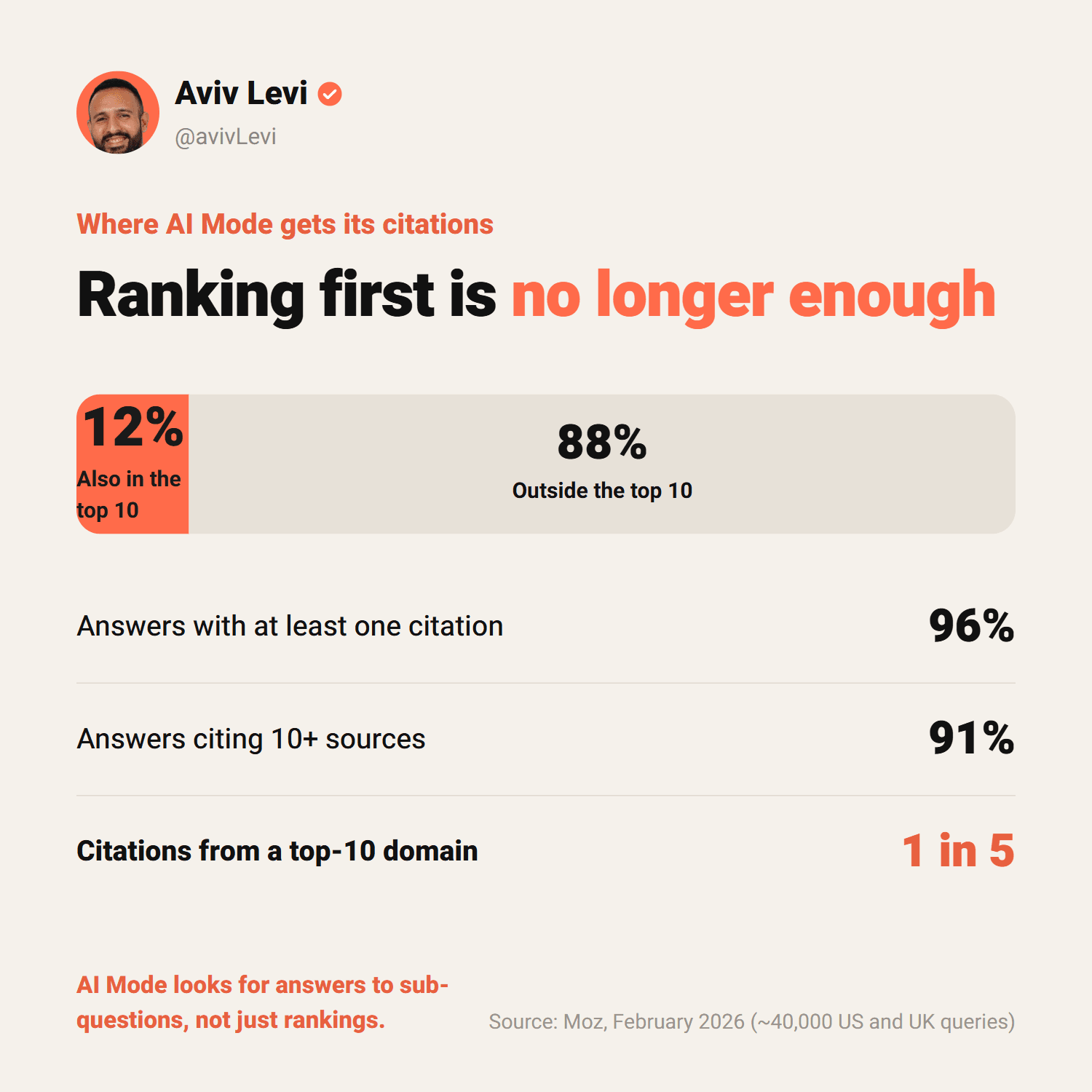
Moz analysed almost 40,000 queries in the US and UK (February 2026) and compared the links AI Mode cites with the top ten organic results for the same query. Only 12% of AI Mode citations also appeared in the top 10. 88% came from elsewhere, and only one in five citations came from a domain that ranks in the top 10.
Semrush measured higher overlap in 2025: about 54% at the domain level and about 35% at the URL level. The gap comes from a different sample, period and method, and both studies covered English-speaking markets. The direction is the same: ranking helps, and it is no longer enough. Fan-out reaches pages that answer the sub-questions, even when they don't rank for the original query.
For smaller companies this is good news. Outranking a major publisher on "AI Mode" is hard. Writing the best answer to a specific question in your field, one nobody else has answered well, is much easier.
What does Google say it takes to appear?
In December 2025 Google updated its official guide for site owners on AI features in Search. The key line: to appear as a link in AI Mode or AI Overviews, a page must be indexed and eligible to be shown with a snippet. There are no additional technical requirements and no special AI markup.
What the guide does list are SEO fundamentals many sites still miss:
- Open crawling. robots.txt and your CDN don't block Googlebot.
- Internal links that make the page findable.
- Important content in text, not only inside images or video.
- Structured data that matches the visible text on the page.
- A good page experience, with high-quality images and video.
- An up-to-date Business Profile for businesses with a local presence.
In other words, there is no shortcut. No magic file and no separate "AI SEO" for Google. There are crawlable pages, and content that answers a question better than the alternatives.
Should you block Google-Extended?
Some companies consider blocking Google-Extended in robots.txt and worry about what that does to AI Mode. According to Google's documentation, Google-Extended controls whether content from your site may be used to train future generations of Gemini models and for grounding in Gemini Apps and Vertex AI. Google states that it does not impact a site's inclusion in Google Search and is not used as a ranking signal. If you want your site out of AI Mode and AI Overviews, you need a different tool: the Search generative AI control in Search Console. And the other way around: Google says that control doesn't affect AI training and points to Google-Extended for that. They are two separate decisions.
How do businesses and CEOs get cited in AI Mode? 7 steps
This is the process I use in CEO personal branding and with companies. It is based on Google's guidance and the research behind this series, and it works for both your website and LinkedIn.
- Map your fan-out. List the 10 to 15 questions buyers ask before they buy, and break each into sub-questions: price, comparisons, how to choose, common mistakes, who it is not for.
- One page per core question. Not a generic "services" page, but an article or page that answers one question completely.
- Answer before you explain. Open every page and section with a 30 to 80 word answer block, and write subheadings as questions so each section answers one sub-question.
- Data, quotes and sources. Princeton's GEO study found that adding quotations raised visibility in AI engine answers by 41%, statistics by 31% and cited sources by 28%. Keyword stuffing lowered it.
- The same language everywhere. The same terms and the same definition of what you do on your site, your LinkedIn profile and company page and in press about you. When every source tells the same story, it is easier to trust.
- LinkedIn as a second door. LinkedIn articles and posts are crawled and rank on Google. When I checked in October 2026, a LinkedIn article ranked third on Google Israel for "לידים מלינקדאין" (LinkedIn leads), and a LinkedIn post ranked second for "מיתוג אישי בלינקדאין" (LinkedIn personal branding). A site article and a LinkedIn article on the same question are two doors to the same body of knowledge. That is why writing LinkedIn posts and articles in the CEO's own voice is part of visibility work, not just branding.
- Keep it current. A visible updated date, current data, and removing what is no longer true. AI Mode itself changes every few months, and your content should too.
How do you measure traffic from AI Mode?
According to Google, clicks and impressions from AI Mode are counted in the Search Console Performance report under the "Web" search type, together with regular search. In June 2026 Google added a dedicated Search Generative AI performance report that shows impressions in AI features by page, country, device and date. It shows impressions only, not clicks, and is rolling out to sites gradually.
Beyond Google's data, I recommend a simple manual check: a fixed list of 10 to 20 questions your buyers ask, run once a month in AI Mode, ChatGPT and Gemini. Note who gets cited and whether you are there. After three months you can see a trend. Which metrics to track is covered in the section on measuring AI search visibility.
What does this mean for smaller and non-English markets?
When I searched for "מצב ai" (AI Mode) on Google in Israel, all ten top results were tech and consumer sites explaining what it is and how to turn it on. None answered the question a business owner cares about: how do I show up there?
That is typical of smaller-language markets. There is far less professional content in Hebrew than in English. I saw it in my check of AI Overviews on Google Israel too: in one search, the overview cited seven English sources and only one in Hebrew. So when AI Mode fans out an Israeli CEO's question, it often has few good sources to choose from. Whoever writes those answers now, on their site and on LinkedIn, fills the gap.
The bottom line
AI Mode doesn't replace the need for good content. It raises the bar. Instead of competing for one spot on a page, you compete to be one of the sources the model trusts when it assembles an answer. The way there is the way that always worked, only more consistent: answer your buyers' real questions, in your own voice, everywhere they and Google look.
Frequently asked questions
What is Google AI Mode?
AI Mode is a tab in Google Search where Gemini answers in a conversation, with links to sources and follow-up questions. It launched at Google I/O in May 2025, and Google says it passed one billion monthly users in May 2026.
What is the difference between AI Mode and AI Overviews?
AI Overviews is a summary at the top of regular results that appears only when Google thinks it adds value. AI Mode is a separate conversation screen the user chooses, with more sources: about 7 unique domains per query on average, versus about 3 for AI Overviews (Semrush, 2025).
How do I turn on AI Mode?
There is nothing to switch on: go to google.com/ai, click "AI Mode" after typing a question on Google Search, or tap the AI Mode icon in the Google app. Chrome also has an "AI Mode" button next to the address bar.
Why don't I have AI Mode?
In Chrome, AI Mode is rolling out gradually and isn't available to everyone yet. You can still open it at google.com/ai or in the Google app. In Chrome, right-click the address bar and check that "Always show AI Mode" is selected. The requirement for a personal Google Account and an age of 13 or older appears in Google's help center for the Search Labs experiment, not on the page for regular AI Mode.
How do I turn off AI Mode?
AI Mode only opens when you choose it. Google says Search features can't be turned off, but the "Web" filter shows only text-based links, without AI Overviews. In Chrome you can hide the button by right-clicking the address bar.
Is AI Mode available in Hebrew and other languages?
Yes. AI Mode added Hebrew on 8 October 2025, as part of an expansion to more than 35 languages, and Google's help center lists Israel and Hebrew among the supported countries and languages. Gemini 3 Pro inside AI Mode is available in English only, according to Google.
Is AI Mode free?
Google's help center doesn't mention any payment or subscription for regular AI Mode: you open it from Google Search. A subscription only comes in with Gemini 3 Pro inside AI Mode, which has daily usage limits. Once you hit the limit, you can wait for it to refresh or upgrade to a Google AI plan.
What is the difference between AI Mode and ChatGPT?
AI Mode is part of Google Search and cites pages from Google's index. In ChatGPT, web search happens when the model decides the question needs current information or when you pick "Search", and the answer links to its sources. According to OpenAI, a site has to allow the OAI-SearchBot crawler to be eligible to appear there.
How does my business appear in AI Mode?
According to Google, the page must be indexed and eligible for a snippet, with no additional technical requirements. Beyond that, AI Mode splits each question into sub-questions (query fan-out), so write clear answers to your buyers' specific questions, on your site and on LinkedIn, with data and sources.
If I rank first on Google, will I appear in AI Mode?
Not necessarily. According to Moz (February 2026, almost 40,000 US and UK queries), only 12% of AI Mode citations appeared in the top ten organic results for the same query.
How can I see traffic from AI Mode?
In Search Console. AI Mode traffic is included in the Performance report under the "Web" search type, and since June 2026 there is also a dedicated report for impressions in Google's AI features.