
Is LinkedIn Premium worth it? What you get with each plan

Published: · Updated: · 9 min read
Quick answer
What is LinkedIn Premium?
LinkedIn offers a free basic account and, next to it, several paid subscriptions grouped under the name Premium. The free account gives you quite a lot: search and view profiles, connect, request and give recommendations, receive unlimited InMail, and save up to three searches with a weekly alert.
What it doesn't give you: messaging people you're not connected to, a year of who viewed your profile, advanced search, and insights on companies and applicants. And one limit fewer people know: on a free account you can add a personal note to only five connection requests a month. On Premium, notes are unlimited.
According to LinkedIn, eligible members can try Premium free for a month. If you've used a free trial in the last 12 months, you won't get another one yet.
Which LinkedIn Premium plans are there today?
These are the subscriptions LinkedIn lists in its Help Center, as of October 2026:
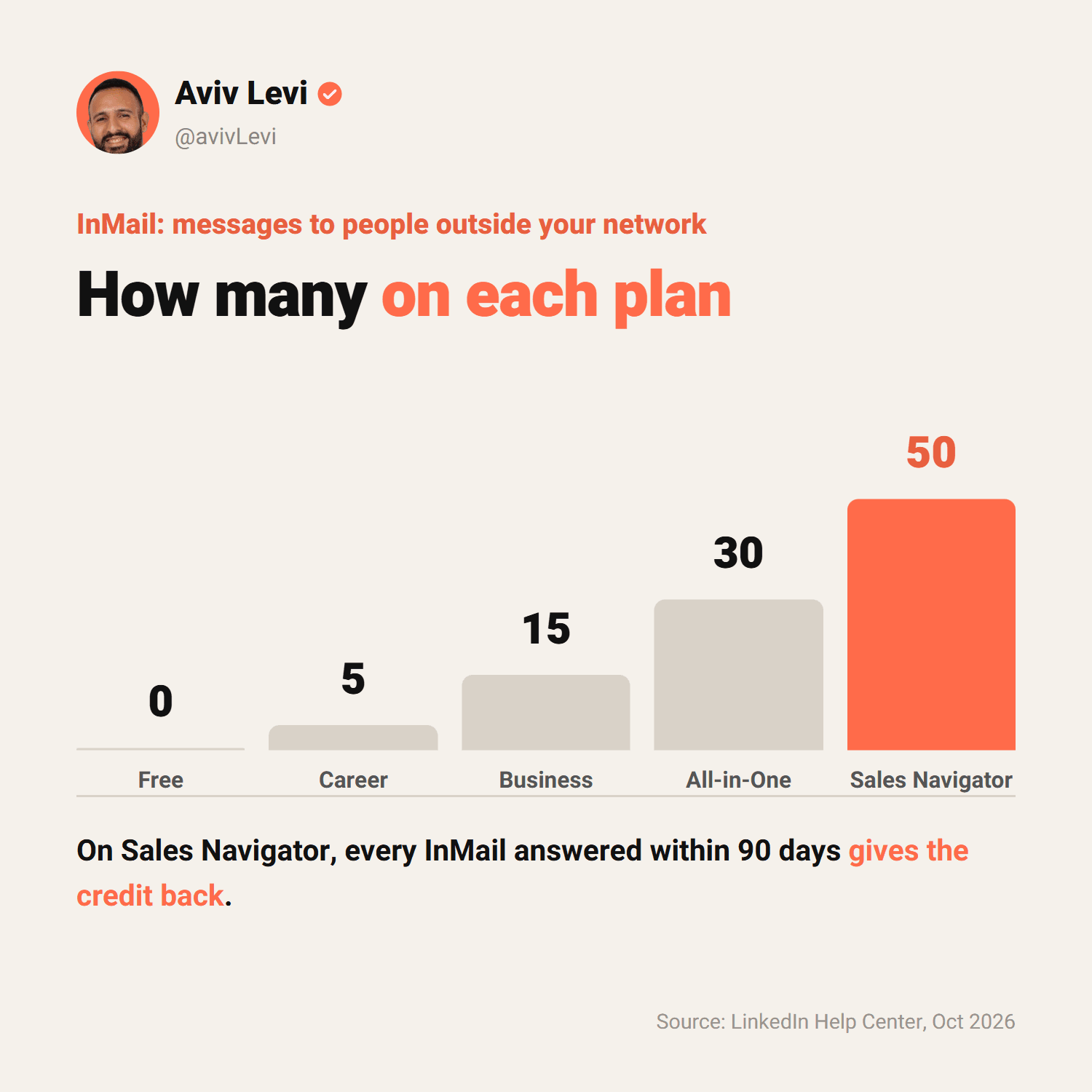
- Premium Career. For job seekers and anyone who wants to grow their career: insights on jobs and other applicants, a top-choice job signal, LinkedIn Learning and 5 InMail messages a month.
- Premium Business. For business owners and anyone growing a business: company insights, a custom button on your profile, upgraded service page features and 15 InMail messages a month.
- Premium All-in-One. For small business owners: daily prospect suggestions, search with advanced filters, a monthly credit for boosting posts and promoting jobs, and 30 InMail messages. LinkedIn says it's still testing this plan, and it may not be available for purchase in every country.
- Sales Navigator. The B2B sales tool, in three plans (Core, Advanced and Advanced Plus): a separate interface, 50+ filters, lead lists, alerts and 50 InMail messages a month.
- Recruiter Lite. Entry-level hiring for individuals and small businesses: network access up to 3rd-degree connections, 20 candidate search filters and 30 InMail messages a month.
There are two more that matter less for this decision: Premium Company Page for your company page (who visited, customer testimonials), and LinkedIn Learning for courses only.
What does each plan include?
| Feature | Career | Business | Sales Navigator Core | Recruiter Lite |
|---|---|---|---|---|
| InMail messages per month | 5 | 15 | 50 | 30 |
| Who viewed your profile, 365 days | Yes | Yes | Yes | Yes |
| Private browsing | Yes | Yes | Yes | Yes |
| LinkedIn Learning | Yes | Yes | Yes | No |
| Business insights | No | Yes | Yes | Yes |
| Custom profile button | No | Yes | Yes | Yes |
| Advanced search | No | No | Yes | Yes |
| Lead lists and real-time alerts | No | No | Yes | No |
| Hiring and job-posting tools | No | No | No | Yes |
Look at the advanced search row: Premium Business doesn't include it. Many people buy Business to find clients and discover that search stays the same as on the free account.
Which plan fits your goal?
| Your goal | The plan that fits | Why |
|---|---|---|
| Get a job | Premium Career | Job and applicant insights, top-choice job and InMail to recruiters |
| Visibility and credibility for a business or consultant | Premium Business | Profile button, service page, company insights and unlimited notes on connection requests |
| Find B2B clients on a regular basis | Sales Navigator Core | Advanced search, lists, alerts and 50 InMail a month |
| A small business that wants clients, promotion and hiring | Premium All-in-One, if available to you | Daily prospect suggestions, credits for boosting posts and jobs |
| Hire without a recruiter | Recruiter Lite | Candidate search, tracking and job posting |
| Just see who visits your profile | Probably none | Not a good enough reason to pay |
How should a CEO or founder decide?
The most common mistake I see with CEOs is buying Premium for the badge on their profile, hoping it will change something. It won't. What makes decision-makers reply is a profile that says exactly what you do and for whom, content that shows you understand the field, and a personal message about them.
So I suggest answering three questions before you pay:
- What's the goal for the next 90 days? Client meetings, hiring, or visibility? Each goal points to a different plan, and sometimes to none.
- How many people outside your network will you contact each month? If it's a handful, a connection request with a personal note is enough. If it's regular outreach to decision-makers, Sales Navigator's search and InMail are worth it.
- Who will do the work? A subscription doesn't work on its own. Without time to build lists, read profiles and write messages, it stays a line on your credit card.
Before I start working with a CEO, the first question isn't which tool, but who the client is and what hurts them. The tool comes later.
If you've concluded that Sales Navigator is the way to go, I wrote a full guide to it: what each plan includes and how to build a search for decision-makers, step by step.
Which Premium features actually help a CEO?
Out of the whole list of features, these are the four I see making a difference for CEOs who reach out to clients:
- Unlimited notes on connection requests. A free account gets five a month. If you reach out to a few decision-makers a week you hit that fast, and a request with a personal note explains why you reached out and filters who accepts.
- Who viewed your profile, a year back. After a post or an outreach message, it shows who checked you out. An executive who opened your profile after your message is a sign of interest, and a good reason for a short follow-up.
- InMail for a few people. 15 messages a month on Business are enough for a handful of decision-makers who don't accept connection requests. For regular outreach it's not enough, and that's where Sales Navigator comes in.
- A custom profile button. On Business and above you can add a button to your profile, for example to book a call or visit your site. Whoever opens your profile after your message knows the next step.
What matters less to a CEO: the applicant and job insights, which are built for job seekers, and LinkedIn Learning, which is a nice bonus but not a reason to pay. If most of what interests you on the list is on the job-seeker side, Premium Career is enough, and if nothing on it is relevant, you can stay on the free account.
What doesn't Premium do?
- It doesn't lift the connection-request limit. According to LinkedIn, it applies to all members, free and Premium. Going over it can block you from sending invitations, typically for a week.
- It doesn't guarantee replies. InMail is a chance to reach out, not a promise of an answer. A template message gets ignored with or without a badge.
- It doesn't allow automation. LinkedIn prohibits software and extensions that automate activity on the site, and accounts that use them risk being restricted or shut down, paid subscription or not.
- It doesn't replace content. It adds tools to your account. Your profile and content are what give people a reason to reply.
How do you cancel LinkedIn Premium?
If you bought directly from LinkedIn, on desktop:
- Click your photo (Me) at the top of the page.
- Select Premium features.
- Click Manage subscription. The LinkedIn Admin Center opens.
- Select Purchases and your active subscription.
- Click Cancel subscription, then Confirm cancel.
- When does it take effect? A paid plan stays active until the end of the billing cycle. A cancelled free trial ends immediately.
- To avoid paying for another month, cancel at least one day before the billing date. After a free trial, the card is charged one month after you signed up.
- Bought on iPhone through the App Store? Cancel through Apple, on the device. Bought on Android through Google Play? You can cancel on LinkedIn or in Google Play.
- On Sales Navigator cancelling is similar, but your messages, saved leads and saved accounts are removed as soon as you cancel. If you buy again, you start from an empty account.
Frequently asked questions
Is LinkedIn Premium worth it?
Only if you have a goal the plan serves. Premium Career can help job seekers, Sales Navigator fits people who look for B2B clients regularly, and if you mostly want to see who visited your profile, probably not. You can try it free for a month and decide.
How much does LinkedIn Premium cost?
The price varies by plan, country and billing cycle, and LinkedIn localizes prices for each country. This site doesn't list prices, not even for other companies' tools. The current price is on LinkedIn's official plans page, linked in the sources.
Can you get LinkedIn Premium for free?
Eligible members can try Premium free for a month, once every 12 months. You enter a card, and it's charged at the end of the month unless you cancel at least one day before. If you signed up on desktop, you get a reminder email before the charge.
What's the difference between Premium Business and Sales Navigator?
Premium Business upgrades your regular account: company insights, a profile button and 15 InMail a month, without advanced search. Sales Navigator is a separate sales tool: 50+ filters, lead lists, alerts on changes and 50 InMail a month.
What happens when you cancel Premium?
Your account goes back to free at the end of the billing cycle. You lose InMail credits, profile insights, LinkedIn Learning, the Premium badge and the advanced search filters. Your account itself, your profile and your connections stay.
Can people see that I have Premium?
Yes. Premium members have a badge on their profile, and LinkedIn lists it among the features you lose when you cancel.
Can you switch from Premium to Sales Navigator?
Yes. From Premium Career or Premium Business you can upgrade to Sales Navigator or Recruiter Lite through Premium features and then Change plan. You pay a prorated amount until the next billing date. If you switch during a free trial, you lose the trial.