
LinkedIn Sales Navigator: what it is, how to use it, and who it's worth it for

Published: · Updated: · 10 min read
Quick answer
What is LinkedIn Sales Navigator?
LinkedIn describes Sales Navigator as its B2B sales tool for individual sellers and sales teams. It runs on the same network of more than a billion members, but in a separate interface, with much more precise search, lists, alerts and its own inbox.
The practical difference is simple. On a regular account you search for people. In Sales Navigator you search for an audience: every finance leader at a 50-to-200-person software company in your region who changed roles in the last three months. Then you save the search, and LinkedIn tells you when new people match it.
Two things worth knowing up front. The interface is available in seven languages only (English, Spanish, French, German, Italian, Portuguese and Dutch). And after you pay, your personal account is still the same account: the same connection-request limits, and the same profile people will see when you reach out.
What do you get? The key features
- Lead and account search. More than 50 filters, including current job title, seniority level, function, company headcount, geography, industry, years in role and profile language. The search bar also accepts Boolean operators (AND, OR, NOT).
- Saved searches. Save a search and get a weekly email and an alert when new people or companies match it. You can save up to 50 lead searches and 50 account searches.
- Lead and account lists. Group people and companies into your own lists, for example "fintech CEOs", and follow them in one place.
- Alerts. When a saved lead changes jobs or roles, or a saved account has an important update, you see it. That's a good reason to reach out at the right time.
- InMail. 50 credits a month for messages to people you're not connected to, on every plan. Unused credits roll over, up to 150 and for 90 days. Every InMail answered within 90 days gives the credit back, even if the answer is "not interested".
- TeamLink. Shows which of your colleagues is directly connected to a lead, so you can ask for a warm introduction. Only on the Advanced and Advanced Plus plans.
- CRM integration. Add leads to your CRM, sync, and view profiles inside Salesforce, HubSpot, Microsoft Dynamics and Oracle. Only on Advanced Plus.
- AI tools. Account IQ and Lead IQ summarize a company and a person, and Message Assist drafts a message. LinkedIn says they're available on all plans, in some languages.
One thing about the automatic drafts: the decision-makers you want to meet get dozens of messages that sound exactly the same. The tool is great at finding the right people. Write the message yourself.
Which plan: Core, Advanced or Advanced Plus?
| Plan | Best for | What it adds |
|---|---|---|
| Core | A seller, consultant or founder working alone | Advanced search, lists, alerts, 50 InMail a month, Account IQ and Lead IQ |
| Advanced | Sales teams | TeamLink, seat management and central billing, Buyer Intent, team reporting, shared lists |
| Advanced Plus | Teams working in a CRM | CRM sync, creating leads directly in the CRM, profiles inside the CRM. Priced through a sales rep |
How much does it cost? This site doesn't list prices, not even for other companies' tools. Sales Navigator's price varies by plan, country and billing cycle (annual billing works out cheaper per month), and sometimes by promotion. The current price is on LinkedIn's plans page, linked in the sources at the end of this article.
Can you try it free? LinkedIn offers a free trial of Core and Advanced to members who don't have a paid LinkedIn subscription (Premium included) and haven't used a free trial in the last 365 days. You need to enter a card, and LinkedIn emails you seven days before the trial ends. Availability varies by country.
Sales Navigator vs Premium vs a free account: what's the difference?
This is the question people ask Google most. The short answer: Premium Business upgrades your regular account. Sales Navigator gives you a separate working tool for selling.
| Feature | Free account | Premium Business | Sales Navigator Core |
|---|---|---|---|
| InMail messages per month | None (receive only) | 15 | 50 |
| Advanced search and filters | Regular search | No | Yes, 50+ filters |
| Lead and account lists | No | No | Yes |
| Alerts on changes at your leads | No | No | Yes |
| Who viewed your profile, 365-day history | No | Yes | Yes |
| Separate sales interface | No | No | Yes |
If your goal is finding clients, Sales Navigator is the tool built for it. Premium Business is a better fit if you mostly want visibility and company insights, and only occasionally message people outside your network. The full comparison of every plan is in the LinkedIn Premium guide.
How to build a search for decision-makers, step by step
This is where most people waste the subscription. They open the tool, type CEO, and get tens of thousands of results. Here's how to build a search you can actually work with. My examples are Israeli, because that's where I work, but the steps are the same anywhere:
Step one: write down who the client is before you open the tool
Role, industry, company size, location, and above all, which problem you solve for them. Before I start working with a CEO, we define the ideal client and their pains first. The tool only translates that definition into filters.
Step two: Geography vs Company headquarters location
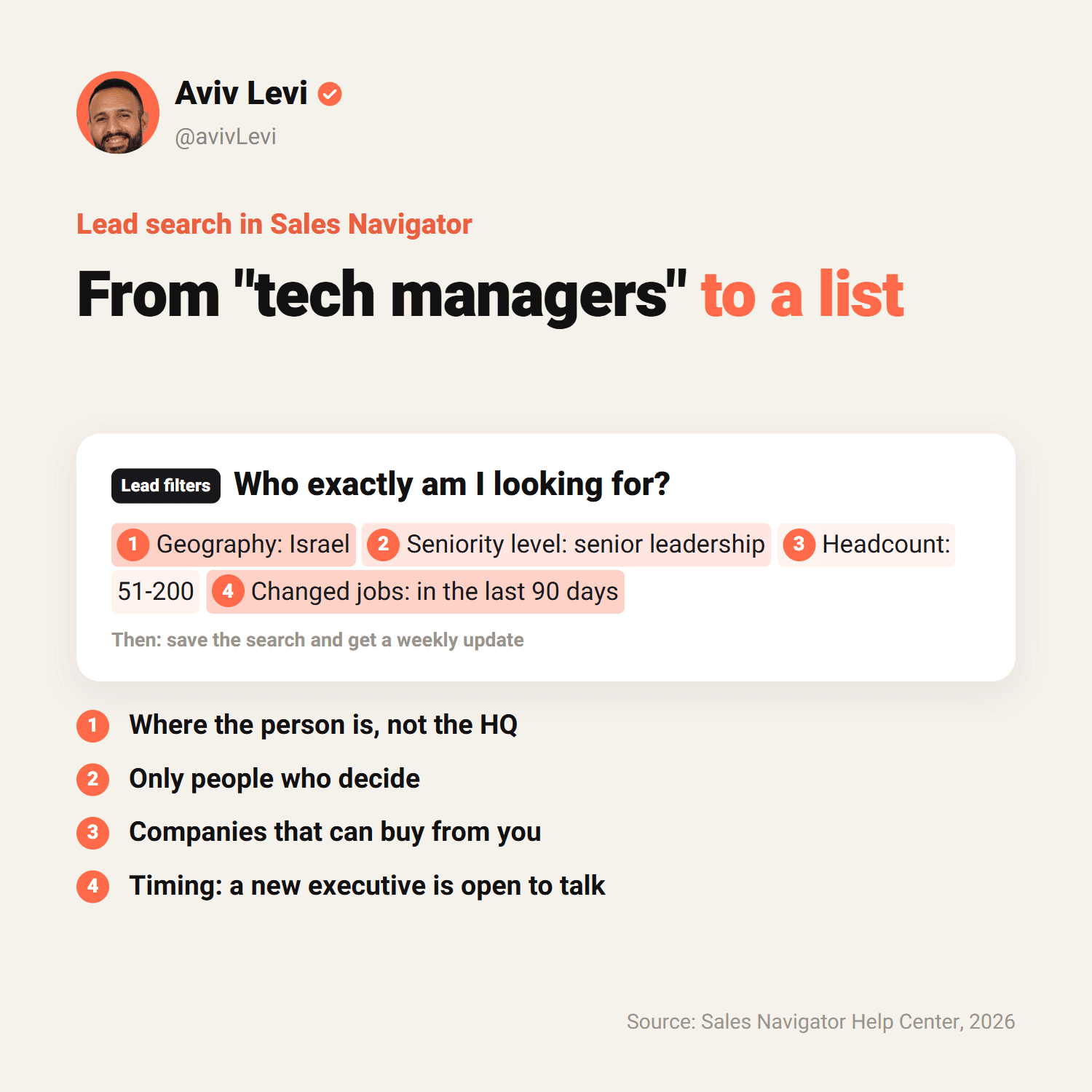
This matters a lot in Israel. Geography searches by where the person is. Company headquarters location searches by where the company's headquarters is. Many Israeli companies are registered with headquarters in the US and R&D in Israel. Filter only by an Israeli HQ and you'll miss them. If the goal is an in-person meeting, start with Geography.
Step three: function and seniority
Combine Function (the area, such as finance or sales) with Seniority level, and if needed Current job title. In Israel, titles are sometimes written in English and sometimes in Hebrew, so run a search with the Hebrew title too. In the search bar you can join several titles with OR, for example CEO OR Founder OR "Managing Director".
Step four: company size and industry
Company headcount and Industry narrow the list to companies that can actually buy from you. "Software companies with 51 to 200 employees" is a list. "Tech" isn't.
Step five: add timing signals
Two filters I especially like: Changed jobs, people who changed roles in the last 90 days, and Posted on LinkedIn, people who posted in the last 30 days. A new executive is building a plan and is open to conversations. And someone who posts is on LinkedIn and will see your message.
Step six: save the search and the leads
Turn on Save search to get a weekly update on new people who match, and save the relevant leads to a list. That way the tool works for you even when you're not in it.
Step seven: read first, then reach out
Before each message, open the profile and the recent posts and find one detail that shows you paid attention. The list is only the start. What makes people reply is a short, personal message about them. I explain how to write it, step by step, in the LinkedIn outreach guide.
How does Sales Navigator relate to SSI?
SSI (Social Selling Index) is LinkedIn's 0-to-100 score that measures four things: your professional brand, how well you find the right people, your engagement with content, and the relationships you build. According to the Sales Navigator Help Center, your activity in the tool counts too: searches, profile views, and saved leads and accounts. On team accounts, your admin and team can see the score.
But it's worth knowing what LinkedIn itself writes now: that the score no longer accurately reflects the modern sales environment, and that a high score doesn't always mean an effective seller or real results. Instead, it recommends measuring closed deals.
I agree. SSI is a nice way to check that you're active. What I measure, for myself and my clients, is three numbers: how many requests were accepted, how many people replied, and how many reached a call.
What are the limits, and where do people go wrong?
- Sales Navigator doesn't lift the connection-request limit. According to LinkedIn, the limit applies to all members, free and Premium. Going over it can block you from sending invitations, typically for a week. LinkedIn doesn't publish the number.
- Unusual activity leads to restrictions. LinkedIn may temporarily restrict InMail, connection requests, searches and profile views. Restrictions are usually lifted after 24 hours. InMail that gets marked as spam can restrict the account.
- Browser extensions are risky. Per the Help Center, extensions that scrape data or generate many profile views can get the account restricted, and LinkedIn prohibits software that automates activity.
- Sales Navigator is not a CRM. It finds people and tracks them. CRM integration exists only on Advanced Plus.
- When you cancel, the data is gone. Messages, saved leads and saved accounts are removed as soon as you cancel, and you can't export them. If you buy again, you start from an empty account.
And the mistakes I see most: buying the tool before knowing who the client is, building lists that are too broad, sending the same InMail to everyone, and plugging in automation software to "save time". The last one can cost you the account.
Who is Sales Navigator not for?
- Job seekers. Premium Career is built for exactly that, with insights on jobs and other applicants.
- People who send a few messages a month. Regular search and personal connection requests are enough.
- Anyone who hasn't defined their client yet. The tool will show you plenty of results, but it won't tell you who to contact.
- A team that needs CRM sync and buys Core. CRM integration is only on Advanced Plus.
Who it is for: a founder or CEO doing outreach themselves, a B2B sales team, or whoever runs outreach for them. Velut's lead generation service reaches out to five new decision-makers every working day, and every message is written by hand, with no automation tools. A good tool helps you find the people. The message is what makes them reply.
Frequently asked questions
How much does LinkedIn Sales Navigator cost?
The price varies by plan (Core, Advanced or Advanced Plus), country and billing cycle, and annual billing is cheaper per month. Advanced Plus is priced through a LinkedIn sales rep. Current prices are on LinkedIn's official plans page, linked in the sources.
Can I use Sales Navigator for free?
There's a free trial of Core and Advanced for members who don't have a paid LinkedIn subscription and haven't used a free trial in the last 365 days. You enter a card and can cancel before the trial ends without being charged. There's no permanent free version.
Which is better, LinkedIn Premium or Sales Navigator?
It depends on the goal. If you regularly reach out to clients you don't know, Sales Navigator: advanced search, lists, alerts and 50 InMail a month. If you mostly want visibility, insights and 15 InMail a month, Premium Business. If you're looking for a job, Premium Career.
Is Sales Navigator a CRM?
No. It's a tool for finding and tracking people and companies. You can connect it to a CRM such as Salesforce, HubSpot, Microsoft Dynamics or Oracle, but only on the Advanced Plus plan.
Can my employer see what I do in Sales Navigator?
On a team account (Advanced and Advanced Plus), the admin sees usage reports, such as logins and searches, and your SSI score. The account belongs to the company: if you leave, you lose your saved leads, your credits and the messages in your Sales Navigator inbox. You can opt out of tracking your LinkedIn.com activity in the Sales Navigator settings.
Which languages does Sales Navigator support?
The interface is available in seven languages: English, Spanish, French, German, Italian, Portuguese and Dutch. You can still search for people in any country, including profiles written in other languages, and there's a profile-language filter.
How many InMail messages do you get with Sales Navigator?
50 a month on every plan. Unused credits roll over, up to 150 and for 90 days, and every InMail answered within 90 days gives the credit back. You can't buy extra credits.