
How to claim your business in ChatGPT (and why verification fails)
Published: · Updated: · 15 min read
Quick answer
Key takeaways
- Businesses in ChatGPT is OpenAI's beta program, launched on November 10, 2026. Business Hub, in the ChatGPT sidebar, is where you claim, edit, see insights and build an agent.
- You verify the claim with your business phone, business email, website domain (a DNS TXT record) or Shopify. Persona identity verification comes after, and it unlocks everything else.
- Claiming alone doesn't give you the blue check. Persona approval does.
- Insights cover 28 days: mentions (ChatGPT referencing your website, not just your name), website clicks and discovery topics. You never see individual prompts.
- Claiming doesn't make ChatGPT recommend you more often. OpenAI says so in writing.
- I claimed velut.ai on November 12, 2026. The domain check passed. Persona failed for my Israeli sole proprietorship. Match your official records exactly before you start.
What is Businesses in ChatGPT?
Businesses in ChatGPT is OpenAI's program that lets a business claim its profile inside ChatGPT, keep its details up to date and see how often ChatGPT mentions it. OpenAI launched it in beta on November 10, 2026, as a way to reach "the 1.2 billion people who use ChatGPT each week." Everything happens in Business Hub, which opens from the ChatGPT sidebar or at chatgpt.com/business-hub.
The closest comparison is Google Business Profile, with one difference that matters: it doesn't buy you a better position. OpenAI's product page puts it plainly: "ChatGPT continues to make independent recommendations and comparisons. Claiming does not guarantee higher placement or sales."
| Part | What it does | Who gets it |
|---|---|---|
| Business profile | Your category, website, description, logo, contact details, delivery and return policy. ChatGPT may use it to answer questions about you. | Eligible businesses that claim and verify |
| Insights | Mentions, website clicks and discovery topics over the past 28 days | After Persona verification is approved |
| Product feed | Products, prices and availability, by CSV file, hosted URL or Shopify | Businesses that sell products, after Persona |
| Business Agent | A separate, labeled chat where customers ask about your products and policies | Eligible US ecommerce and online service businesses, after Persona |
Is it the same as the ChatGPT Business plan?
No, and the names make it easy to mix them up. ChatGPT Business is OpenAI's paid workspace plan for teams that use ChatGPT at work. Businesses in ChatGPT is the listing program for businesses that customers ask ChatGPT about. OpenAI's help center says you don't need an Ads account or a ChatGPT Enterprise agreement to claim an eligible business.
Who can claim a business in ChatGPT?
Anyone who owns the business or is authorized to represent it, where ChatGPT is offered and where the required verification is supported. OpenAI says eligibility depends on industry, location and its verification and integrity checks, and that claiming starts with businesses that have a website.
| Business | Claim a profile | Create a Business Agent |
|---|---|---|
| US online business (ecommerce or online service) | Yes. Claim an existing listing, or add one if it isn't there | Yes, if its industry meets the Business Agents Policy |
| US local store or restaurant | Only an existing US listing | No. Agents are for ecommerce and online service businesses |
| Online business outside the US | Possible where ChatGPT is offered and verification is supported, but not guaranteed | No. Agents are US only |
| Local business outside the US | Not at launch: local businesses can claim only an existing US listing | No |
| Business without a website | Not at launch | No |
I'm in the third row: an online service business in Israel. I could claim the listing and verify the domain, and the identity step stopped me. The details are below.
Some industries can't claim at all. OpenAI's Businesses in ChatGPT policy says it may decline a business whose offerings raise "significant safety or integrity concerns", and may hold off on other categories until it has the safeguards to support them.
How do you claim your business in ChatGPT, step by step?
- Open Business Hub. Sign in to ChatGPT and select Business Hub in the sidebar, or go to chatgpt.com/business-hub. Use an account the business will keep: whoever claims becomes the admin who invites everyone else.
- Search for your business by name and select the listing that matches. If you run an eligible online business and it isn't listed, you may see an option to add it.
- Confirm the ChatGPT account you'll manage it with.
- Choose a verification method from the ones shown: business phone, business email, website domain or Shopify. Which one to pick is in the next section.
- Fill in the basics. Business Hub asks for a category, a short "More about your business" text, and your delivery and return policy.
- Wait for OpenAI's review. OpenAI emails you its decision or asks for more information. While the claim is pending, you can cancel it.
- Complete Persona verification. It's required to publish changes, see insights, connect a product feed or build an agent, and the blue check appears only after Persona approves you.
If you add a new business, select Create, then Get started. Business Hub asks how customers usually reach you: at a physical location, through an online store, or through a service, which Flavio Copes saw marked "Coming soon" at launch. Then it asks for your website, as a full https:// address. Until the service option opens, an agency or consultant has to fit into screens built for stores, which is why the delivery and return steps below feel odd.
How long the review takes isn't published. Early users report approvals within 15 to 30 minutes, and some waited more than a day.
Two other situations. If you received a claim invitation by email, open the personal link and sign in with the address that received it. If you see Contact support instead of a claim option, the listing is locked, and only support can give you access.
What should you check before you start?
- Use the account the business will keep. Users in OpenAI's forum report there's no way yet to move a profile to another account, for example from a personal account to the company's.
- A new profile goes live on approval. If you create a profile through Persona, OpenAI's approval publishes it automatically. There's no separate publish step.
- Drafts are the only thing you can delete, and users report the Delete draft option disappears once verification starts. Support can't delete a published profile.
- Let OpenAI read your site. If your robots.txt or firewall blocks OpenAI's crawlers, Business Hub can't read the website, and one early user hit exactly that. The five-minute check is in can AI engines read your site?
- Have your Persona details ready before you click anything. More on that below.
Which verification method should you choose?
Use the one you control best. You only need one of the four to claim; Persona comes on top of it.
| Method | What you need | Watch out for |
|---|---|---|
| Business phone | The phone number on the listing, by text message (SMS) or automated call | It only works if the number on the listing is one you answer |
| Business email | The inbox of the email address tied to the business | An employee's address is hard to keep when people leave |
| Website domain (DNS TXT) | Access to your domain's DNS settings, or someone who has it | The record expires, and some DNS panels add your domain to the host by themselves |
| Shopify store | An admin login to the Shopify store | Connect the store of the business you are claiming |
| Persona (identity, after the claim) | A government-issued ID, business registration details and proof you can represent the business | The business name, address and registration or tax number must match official records |
For most businesses I'd pick the domain. It proves control of the website ChatGPT already links to, and it doesn't depend on who answers the phone.
How do you verify your domain with a DNS TXT record?
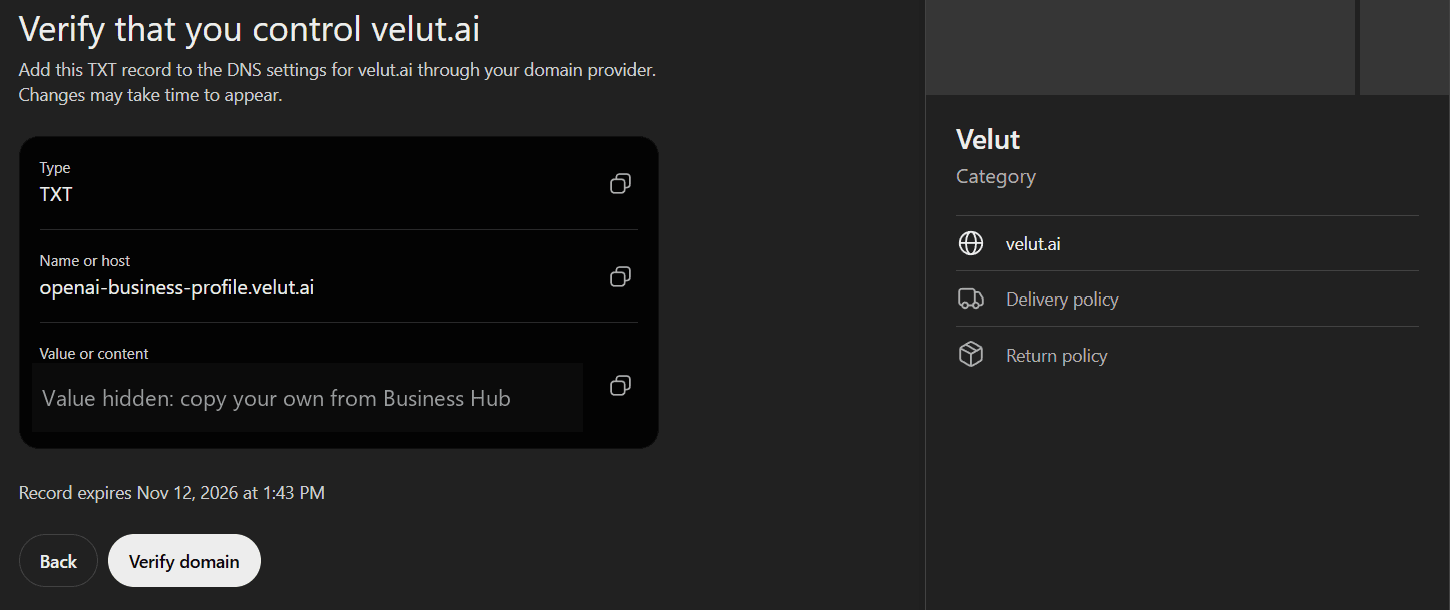
Business Hub shows three values: Type (TXT), Name or host and Value or content. Add them as a new record at your domain provider, then go back and select Verify domain. This is what it looked like for velut.ai:
Three things I learned doing it:
- Check how your DNS panel wants the host. Business Hub showed the host as openai-business-profile.velut.ai. My registrar, Spaceship, adds the domain by itself, so I typed only openai-business-profile. Typing the full name there would have created openai-business-profile.velut.ai.velut.ai, and the check would fail. Many DNS panels work this way, so look at how your existing records are written.
- The record expires. My screen said "Record expires Nov 12, 2026 at 1:43 PM", the same day. If you don't finish in time, go back and get a new value. Some users in OpenAI's forum and YouTube comments report a window of only about 30 minutes, so add the record the moment you get it.
- Copy, don't retype, and copy what your screen shows. Use the copy buttons. Mine said openai-business-profile, but another early user was given openai-business-claim, so don't trust a guide's host name, mine included.
- Check the record before you click Verify. An online DNS lookup, or dig +short TXT with your host name, shows whether the record is live. DNS changes can take time, so if it fails right away, wait and try again before you change anything.
Mine verified. If someone else manages your domain, OpenAI suggests asking them to add the record for you.
What is Persona verification, and why does it fail?
Persona (withpersona.com) is the identity verification company OpenAI uses. After your claim, Persona checks that you, the person, are allowed to represent the business. OpenAI says you may need a government-issued ID, business registration information and proof that you're authorized to represent it. Until Persona approves you, you can't publish changes, connect a product feed, see insights or build an agent.
This is where I got stuck. Persona asked for the business name, a DBA ("doing business as") name, the country, and the business type: Sole Proprietor or Entity.
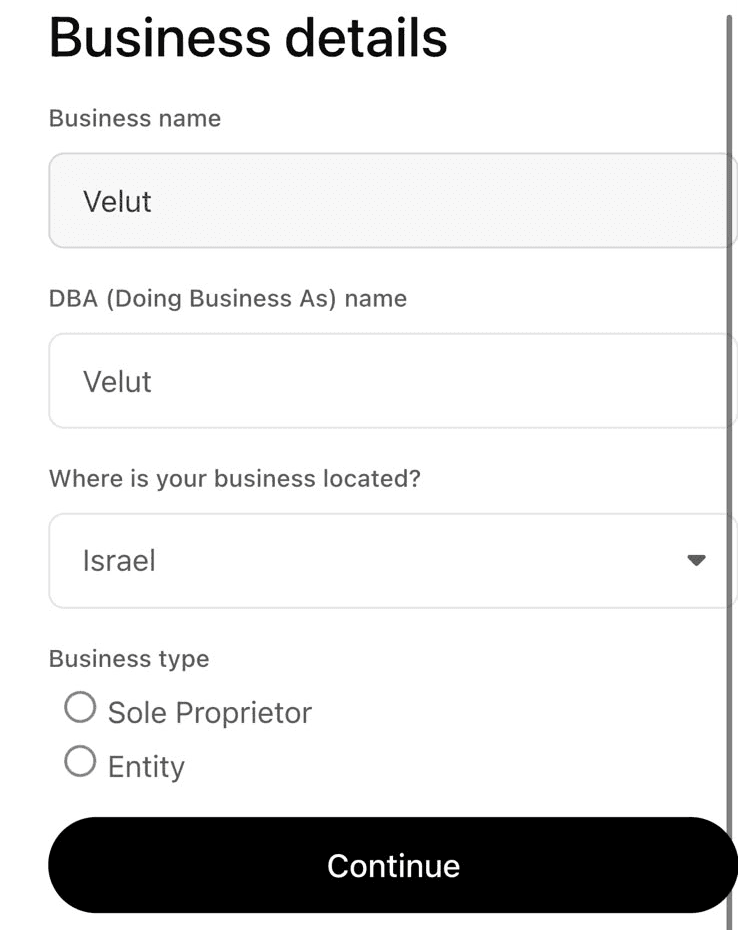
Velut is registered in Israel as a sole proprietorship. Nine minutes after I filled in the business details, Persona emailed: "We were unable to verify your identity for managing Velut's business profile on ChatGPT." Business Hub now shows Verification failed on the profile.
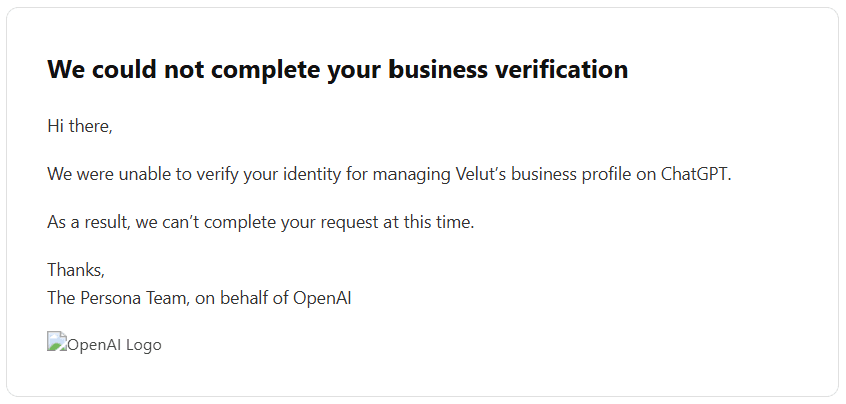
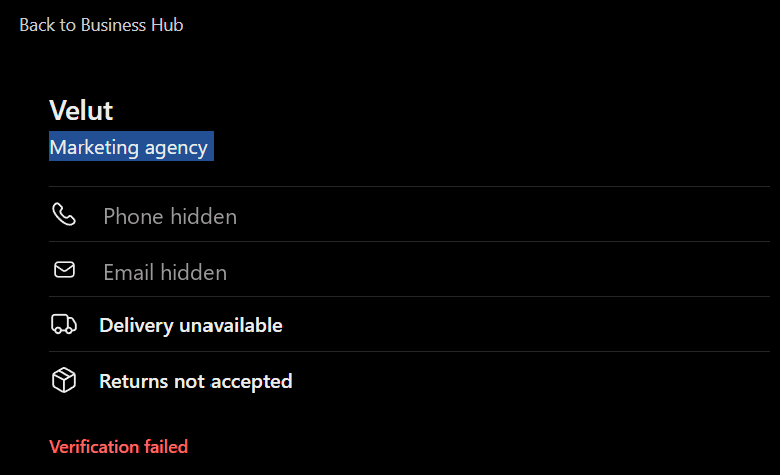
Why it failed is my reading, not OpenAI's: they didn't give a reason. A sole proprietorship is registered under the owner's own name, not the brand. I typed "Velut" as both the business name and the DBA, so there was no official record called Velut for Persona to match. OpenAI's help article says to make sure "the business name, address, and any registration or tax number you provide match your official business records." And Israel isn't the US: OpenAI says availability depends on the business's location and type, and that verification has to be supported there.
I'm not the only one. In OpenAI's developer forum, a user reports Persona failing twice with no reason shown, and UK sole traders who aren't VAT registered say the form asks for a VAT number they don't have. Small and non-US businesses are where this step breaks.
How do you avoid a failed Persona check?
- Use the legal name exactly as it's registered. For a sole proprietor, that's usually your own name. Put the brand in the DBA field.
- Use the registered address and the registration or tax number from your official records, character for character.
- Have your government ID ready, and a document that ties you to the business.
- If the email offers Try again, submit corrected details. Don't open a second claim. If you can't retry, contact OpenAI Support with the step, the error message and a screenshot with personal details removed.
Submitting to Persona doesn't mean you're approved, and review time varies. I'll update this article when I know what fixes a non-US sole proprietorship.
What does the blue check mean in ChatGPT?
It means OpenAI approved the Persona verification of the person managing the profile. The product page says the blue check shows a profile "has been claimed", but the help center is more precise: "Claiming your business alone doesn't give its profile a verified badge. The verified badge, shown as a blue check, appears after your Persona verification is approved."
It doesn't mean OpenAI checked every fact on the profile. Its policy says businesses remain responsible for their information, and that OpenAI "does not verify every detail or resolve every factual dispute."
Early users also report seeing the check and "You've claimed" while the business list still said Pending. Until OpenAI aligns its pages, go by the help article: the badge you can rely on comes with Persona approval.
What should you write in your ChatGPT business profile?
Business Hub asks for a category, an optional "More about your business" text and your delivery and return policy. After Persona approval you can also update the website, description, category, logo, policies, a cover photo and other details. OpenAI reviews changes before they go live.
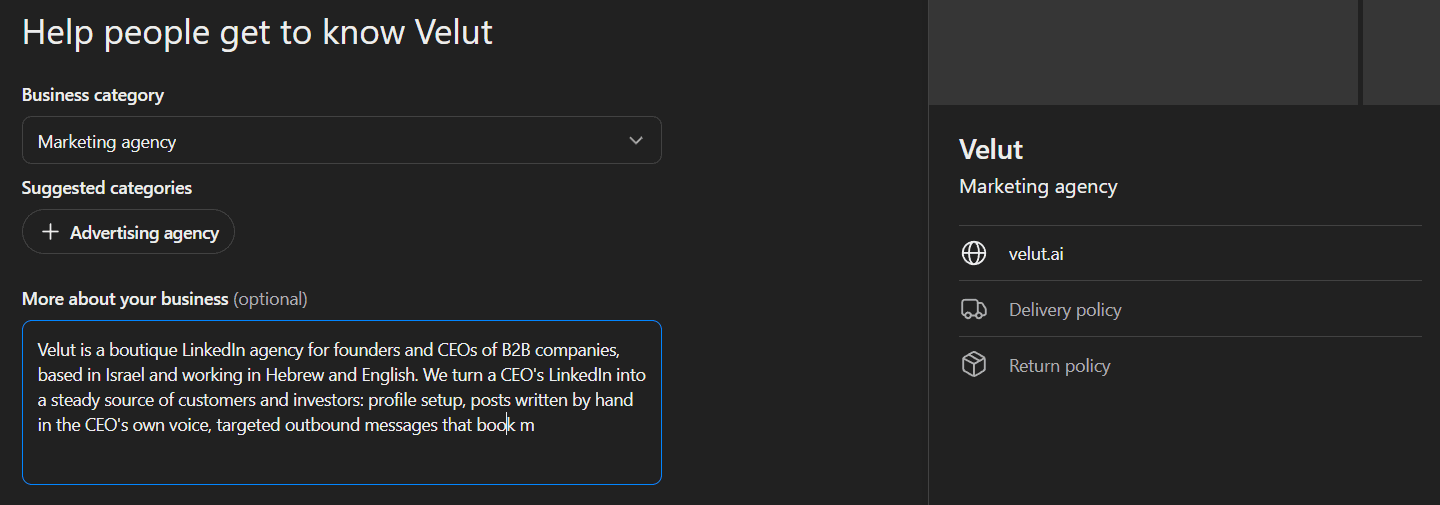
- Category. Pick the closest match. For my agency I chose "Marketing agency"; Business Hub also suggested "Advertising agency".
- More about your business. Up to 300 characters, and it's text ChatGPT may share "when helpful or relevant". Say who you serve, what you do and where, in plain words. There's no room for slogans, and the policy forbids unsupported claims anyway.
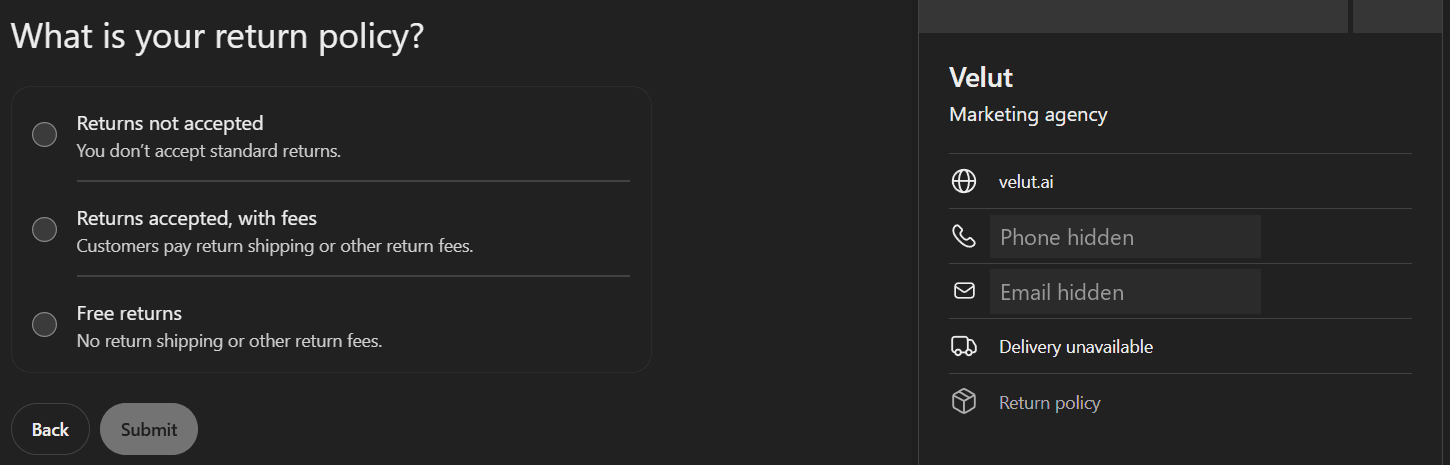
- Delivery and return policy. These screens were built for stores. A service business has to choose from options like "Delivery unavailable" and "Returns not accepted". That's what I chose.
What does OpenAI's policy allow in a profile?
| Do | Don't |
|---|---|
| Keep your name, category, address or service area, hours, contact details and offerings truthful and current | Make false or misleading claims about prices, availability, qualifications or likely results |
| Use photos and logos you have the rights to | Use fabricated reviews or endorsements, unsupported guarantees, or hide fees and conditions |
| Link to relevant pages that are what they say | Use deceptive redirects, or link to phishing, malware or prohibited content |
| Manage only a business you own or represent | Impersonate a business or create a fake or duplicate profile |
OpenAI can decline content, limit who manages a profile, or remove it.
What do Business Hub insights show?
After Persona approval, the Insights tab shows aggregate activity over the past 28 days:
- Mentions. For an online business, a mention counts when ChatGPT references your website. Your brand name alone doesn't count. For a local business, it counts when ChatGPT shows a result for that location, even if nobody opens it.
- Website clicks. How often people clicked through to your site. An OpenAI spokesperson told Digiday these are clicks on links in ChatGPT, not completed visits or purchases.
- Discovery topics. Common themes in the ChatGPT answers that mentioned or cited you. They're categories, not individual prompts, and OpenAI says they don't directly measure customer intent.
You never see individual prompts or conversations, including chats with your own Business Agent. A blank metric isn't zero: it can mean activity is below the reporting threshold, data is still being collected, or reporting isn't available.
This is the first count of ChatGPT mentions from OpenAI itself. Until now we measured it from the outside, with a fixed list of prompts and AI referrals in Google Analytics, as in our own SEO and GEO case study. Use both: Business Hub counts what OpenAI sees, and your analytics count who arrives.
Screenshots from early users, like Cogny's, show Brand and Agent insights tabs, a 7- or 28-day range, and a Profile views tile that OpenAI's help article doesn't define yet.
What is a ChatGPT Business Agent, and who can create one?
A Business Agent is a chat with your business inside ChatGPT. It answers customers' questions with your product and policy information, following instructions you write. It's clearly labeled and kept separate from ChatGPT's own independent answers, and a customer chooses to open it.
To build one, the business has to be an eligible ecommerce or online service business in the US with a website, with an approved claim and an approved Persona check. OpenAI also looks at the business's category and what the agent is for, under its Business Agents Policy: verification alone doesn't guarantee you can publish one. You can't create an agent while verification is pending or after it failed. Even some US online businesses still see "Agent builder isn't available yet": it's rolling out gradually.
| It can | It can't |
|---|---|
| Answer questions about your products, prices and policies | Complete a purchase, make a booking or check a customer's order |
| Link to your website, where the customer completes the action | Use data from your business's plugin in ChatGPT |
| Follow the instructions you write, within the policy | Go live before you review and publish it |
What do the Business Agent rules say?
- Say it's AI. The agent must be clear that it's AI representing the business, not a human, an independent adviser, or endorsed by OpenAI.
- No invented claims. Don't instruct it to make up offerings, prices, availability, credentials, reviews, guarantees or results, or to hide fees and conditions.
- No pressure. No false urgency, and no pushing a sale after someone says no.
- No sensitive data. It can't ask for health details, government IDs, or financial or login credentials.
- No licensed advice. It can't give advice that legally requires a professional license, or claim professional credentials.
How do you set up and publish a Business Agent?
- Open your business in the Business tab. If Shopify setup already created a draft agent, open it; otherwise create one if the option is there.
- Review the information it will use, such as product details and your return policy.
- Write its instructions, following the Business Agents Policy.
- Preview it with a question customers really ask, like OpenAI's example: "Can I return an item I bought on sale?" If the answer is wrong, fix the information or the instructions and test again.
- Select Publish. Customers can only chat with a published agent.
How do product feeds work?
If you sell products, you can connect a feed with prices and availability: a CSV file that follows OpenAI's product feed specification, a hosted URL to that file, or your Shopify catalog. Products must follow OpenAI's Commerce policies. A feed doesn't publish an agent, and it doesn't guarantee ChatGPT will recommend your products. You don't need Shopify to build an agent.
Can you advertise your Business Agent in ChatGPT?
Yes, but not from Business Hub yet. OpenAI's launch post says businesses can "sponsor their Business Agent and use it as the destination for ChatGPT Ads," in placements that are labeled and kept separate from ChatGPT's answers. In practice, the sponsored agent is built separately in Ads Manager, and OpenAI's help article says that today, settings don't sync between the two. It needs a campaign with the Conversion optimization objective, there's no extra charge per conversation, and it's "rolling out to eligible advertisers in Ads Manager over the coming weeks." Ads don't change ChatGPT's own answers.
What are the most common Business Hub problems, and how do you fix them?
| Problem | Likely cause | Fix |
|---|---|---|
| You see "Contact support" instead of a claim option | The listing is locked | Select Contact support and ask for access |
| You can't find your business | It isn't listed, or it's a local business outside the US | An eligible online business can add it. A local business can claim only an existing US listing |
| Domain verification fails | The host was entered with the domain twice, the value was retyped, the record expired, or DNS hasn't updated yet | Check how your DNS panel writes the host, copy the values, get a new record if it expired, and wait before retrying |
| Persona verification failed | The name, address or number doesn't match official records, or verification isn't supported for your location or business type | Use the registered legal name and numbers. Select Try again if the email offers it; otherwise contact support |
| You can't create an agent | Persona is pending or failed, the business isn't eligible (US, type, industry), or you're on the wrong profile | Wait for Persona approval, check the Business Agents Policy, and open the claimed profile |
| Business Hub can't read your website | robots.txt or a firewall blocks OpenAI's crawlers | Allow OAI-SearchBot, GPTBot and ChatGPT-User, then ask for a new check |
| Insights are blank | Below the reporting threshold, or data is still being collected | Wait. If it stays blank, contact support |
| Your changes don't show in ChatGPT | OpenAI reviews changes first, and ChatGPT also uses other sources | Give it time, and fix the other sources too |
| Someone else already claimed your business | Another person verified first | Open the profile, select the ••• menu, then Dispute ownership, and verify with Persona |
| Your agency can't be invited | The business was claimed in a ChatGPT workspace | The admin invites each person's own account; if it's blocked, contact support |
| You want to delete the profile | Only unpublished drafts can be deleted | Overview, the three-dot menu, Delete draft. Support can't remove a published profile |
What do other guides get wrong about Business Hub?
Most guides were written within a day of the launch, and some repeat claims that OpenAI's own pages contradict:
| What you'll read | What OpenAI says |
|---|---|
| Claiming gives you the blue check | The help article: the badge appears after Persona verification is approved |
| You decide what ChatGPT says about you | You manage the information you provide. ChatGPT answers independently and may use other sources |
| Every time ChatGPT names you is a mention | For an online business, a mention needs a reference to your website. The brand name alone doesn't count |
| Any business with a website can claim | Eligibility depends on industry, location and verification. Local businesses can claim only an existing US listing |
| Never let your agency near it | There's an official route: the admin grants an agency access, each person with their own account |
| Insights show impressions or profile views | The help article defines mentions, website clicks and discovery topics. Nothing about impressions |
Will claiming your business make ChatGPT recommend you more?
No. OpenAI says it on the product page, in the help center and in the policy: claiming lets you manage the information you provide, but it "doesn't guarantee increased visibility or give you direct control over ChatGPT's independent recommendations." Advertising doesn't influence those answers either. And ChatGPT may also use other sources when it answers about you.
So the profile fixes facts. It doesn't build trust. What gets you named in an answer is the same as before: being cited by the sources ChatGPT reads. I break that down in how to get ChatGPT to cite you, and the wider discipline in what GEO is and how it differs from SEO.
What should B2B founders and service businesses do now?
Claim your business this week, even if you'll never build an agent. Here's the order I'd do it in:
- Claim and verify with your domain. It's the cleanest proof, and claiming first means you're the admin, not someone else.
- Prepare Persona before you start: the legal name as registered, the registration or tax number, the registered address and your ID.
- Write the 300 characters like an answer: who you serve, what you do, where. That's the text ChatGPT may repeat.
- Fix the sources ChatGPT reads about you: the About page on your site, the founder's LinkedIn profile, and articles under the founder's name. In B2B, AI engines often cite LinkedIn; which formats they cite is in does AI cite LinkedIn?
- Measure once a month: Business Hub insights next to AI referrals in your analytics.
For a B2B company, the profile is the small part. A buyer asks ChatGPT "who should I talk to about this?", and the answer comes from people who have written about it, in public, for a long time. That's the part I build for founders and CEOs: their LinkedIn presence, written by hand in their own voice.
Frequently asked questions
Is it free to claim your business in ChatGPT?
Right now, yes. OpenAI's own pages don't list a fee, and OpenAI's VP of monetization told Digiday that Business Hub and agents are free for now, without ruling out a paid model later. You need a ChatGPT account, but not an Ads account or a ChatGPT Enterprise agreement.
Can I claim my business in ChatGPT outside the US?
Possibly. Eligible businesses can claim where ChatGPT is offered and the required verification is supported, and availability depends on location and business type. Local stores and restaurants can currently claim only an existing US listing, and Business Agents are US only. My Israeli online business could claim and verify its domain, but Persona verification failed.
Can an agency manage my ChatGPT business profile?
Yes. The admin who claimed the business can add teammates in Business Hub and give an agency access to manage the business or its agent, each with their own ChatGPT account. Don't forward your personal claim invitation.
How long does ChatGPT business verification take?
OpenAI says review time varies, and it emails you a decision or a request for more information. Early users report anywhere from 15 minutes to more than a day. My domain claim went through the same day, and Persona's failure email came nine minutes after I filled in its business details.
Do I need Shopify to claim my business or build a Business Agent?
No. Shopify is one way to verify and to share a product catalog. You can claim with your phone, email or domain, and an eligible business can set up an agent without Shopify.
Someone else already claimed my business. What do I do?
Open the business profile, select the ••• menu, then Dispute ownership, and follow the steps to verify with Persona that you're authorized to represent the business.
Can I delete my business profile in ChatGPT?
Only an unpublished draft. Open the Business tab, select the draft, go to Overview, open the three-dot menu and select Delete draft. OpenAI Support can't delete, unpublish or hide a published profile.